Helmholtz Equation PINN
| Metadata | Value |
|---|---|
| Level | Intermediate |
| Runtime | ~2 min (GPU) / ~8 min (CPU) |
| Prerequisites | JAX, Flax NNX, wave physics |
| Format | Python + Jupyter |
| Memory | ~800 MB RAM |
Overview
This tutorial demonstrates solving the 2D Helmholtz equation using a Physics-Informed Neural Network (PINN). The Helmholtz equation arises in acoustics, electromagnetics, seismology, and quantum mechanics as the time-independent form of the wave equation.
This example showcases a hard boundary constraint technique where the network output is multiplied by a function that vanishes on boundaries, automatically satisfying Dirichlet conditions without explicit boundary loss.
What You'll Learn
- Implement a PINN for the Helmholtz equation with oscillatory solutions
- Apply hard boundary constraints using output transforms
- Use sinusoidal activation functions for wave-like solutions
- Handle high-frequency solutions that challenge spectral bias
- Compare hard vs soft boundary enforcement strategies
Coming from DeepXDE?
If you are familiar with the DeepXDE library:
| DeepXDE | Opifex (JAX) |
|---|---|
dde.geometry.Rectangle([0,0], [1,1]) |
jax.random.uniform(key, (N, 2)) for (x, y) |
dde.grad.hessian(y, x, i=0, j=0) |
jax.hessian(u_fn)(xy)[0, 0] for u_xx |
net.apply_output_transform(transform) |
Hard constraint in __call__ method |
dde.nn.FNN([2]+[150]*3+[1], "sin") |
Custom HelmholtzPINN with jnp.sin activation |
model.compile("adam", lr=1e-3) |
nnx.Optimizer(pinn, optax.adam(lr), wrt=nnx.Param) |
Key differences:
- Hard constraint in model: BC enforcement built into network forward pass
- Sin activation:
jnp.sin(layer(h))instead of tanh for oscillatory solutions - No BC loss: With hard constraints, only PDE residual is needed
- Zero boundary error: Hard constraint achieves machine precision on boundaries
Files
- Python Script:
examples/pinns/helmholtz.py - Jupyter Notebook:
examples/pinns/helmholtz.ipynb
Quick Start
Run the Python Script
Run the Jupyter Notebook
Core Concepts
Helmholtz Equation
The Helmholtz equation is an elliptic PDE:
| Component | This Example |
|---|---|
| Domain | \([0, 1] \times [0, 1]\) |
| Wave number | \(k_0 = 4\pi\) (2 wavelengths per unit) |
| Source term | \(f = k_0^2 \sin(k_0 x) \sin(k_0 y)\) |
| Boundary conditions | \(u = 0\) on \(\partial\Omega\) (Dirichlet) |
| Analytical solution | \(u = \sin(k_0 x) \sin(k_0 y)\) |
Hard Boundary Constraint
Instead of adding a boundary loss term, we modify the network output:
This ensures \(u = 0\) on all boundaries exactly because: - At \(x = 0\) or \(x = 1\): \(x(1-x) = 0\) - At \(y = 0\) or \(y = 1\): \(y(1-y) = 0\)
PINN Architecture
graph TB
    subgraph Input["Collocation Points"]
        A["Domain Points<br/>(x, y) in [0,1]²"]
    end

    subgraph PINN["Neural Network with Hard Constraint"]
        B["Linear + sin<br/>150 units"]
        C["Linear + sin<br/>150 units"]
        D["Linear + sin<br/>150 units"]
        E["Linear<br/>1 unit"]
        F["Hard BC Mask<br/>x(1-x)·y(1-y)"]
        G["u = mask × u_hat"]
    end

    subgraph Loss["Physics-Informed Loss"]
        H["PDE Residual Only<br/>|-∇²u - k₀²u - f|²"]
    end

    A --> B --> C --> D --> E --> F --> G --> H

    style F fill:#e8f5e9,stroke:#388e3c
style H fill:#e3f2fd,stroke:#1976d2Implementation
Step 1: Imports and Configuration
Terminal Output:
======================================================================
Opifex Example: Helmholtz Equation PINN
======================================================================
JAX backend: gpu
JAX devices: [CudaDevice(id=0)]
Wave number: k0 = 12.5664 (n=2 modes)
Wavelength: 0.5000
Domain: [0, 1] x [0, 1]
Collocation: 2500 domain, 400 boundary
Network: [2] + [150, 150, 150] + [1]
Hard BC constraint: True
Training: 5000 epochs @ lr=0.001
Step 2: Define the Problem
N_MODES = 2  # Number of wavelengths in each direction
K0 = 2.0 * jnp.pi * N_MODES  # Wave number k0 = 4*pi

def exact_solution(xy):
    x, y = xy[:, 0], xy[:, 1]
    return jnp.sin(K0 * x) * jnp.sin(K0 * y)

def source_term(xy):
    x, y = xy[:, 0], xy[:, 1]
    return K0**2 * jnp.sin(K0 * x) * jnp.sin(K0 * y)
Terminal Output:
Helmholtz equation: -nabla^2(u) - k0^2 * u = f(x,y)
  Wave number: k0 = 2*pi*2 = 12.5664
  Source term: f = k0^2 * sin(k0*x) * sin(k0*y)
  Boundary: u = 0 (Dirichlet)
  Analytical solution: u = sin(k0*x) * sin(k0*y)
Step 3: Create PINN with Hard Constraint
class HelmholtzPINN(nnx.Module):
    def __init__(self, hidden_dims: list[int], *, rngs: nnx.Rngs):
        layers = []
        in_features = 2
        for hidden_dim in hidden_dims:
            layers.append(nnx.Linear(in_features, hidden_dim, rngs=rngs))
            in_features = hidden_dim
        layers.append(nnx.Linear(in_features, 1, rngs=rngs))
        self.layers = nnx.List(layers)

    def __call__(self, xy):
        h = xy
        for layer in self.layers[:-1]:
            h = jnp.sin(layer(h))  # sin activation
        u_hat = self.layers[-1](h)

        # Hard constraint: u = x*(1-x) * y*(1-y) * u_hat
        x, y = xy[:, 0:1], xy[:, 1:2]
        bc_mask = x * (1 - x) * y * (1 - y)
        return bc_mask * u_hat
Terminal Output:
Step 4: Training (PDE Loss Only)
def total_loss(pinn, xy_dom, xy_bc, lambda_bc=100.0):
    loss_pde = pde_loss(pinn, xy_dom)
    # No boundary loss needed with hard constraint!
    return loss_pde
Terminal Output:
Training PINN...
  Epoch     1/5000: loss=6.029034e+03
  Epoch  1000/5000: loss=9.683103e+01
  Epoch  2000/5000: loss=3.790305e+01
  Epoch  3000/5000: loss=1.175391e+01
  Epoch  4000/5000: loss=8.398210e+00
  Epoch  5000/5000: loss=3.463675e+00
Final loss: 3.463675e+00
Step 5: Evaluation
Terminal Output:
Evaluating PINN...
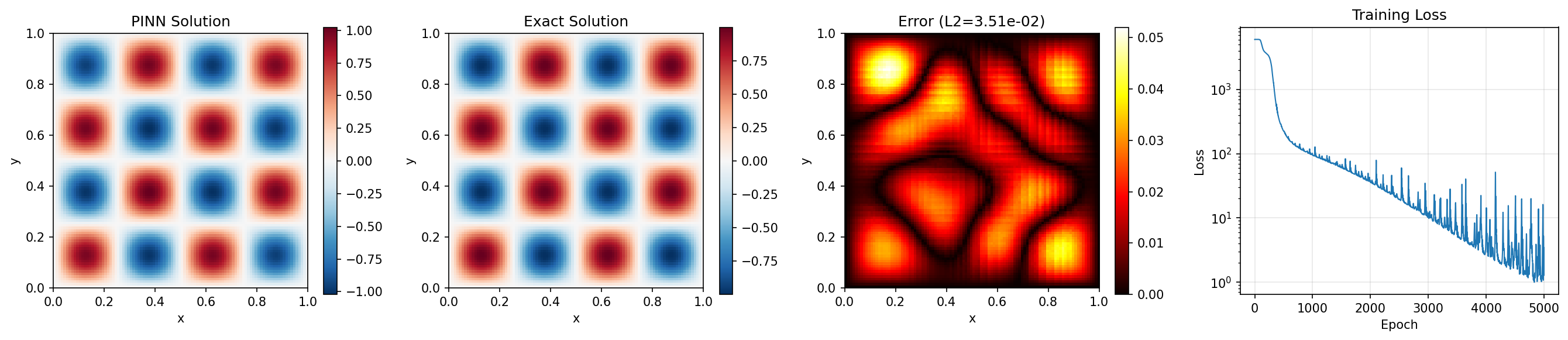
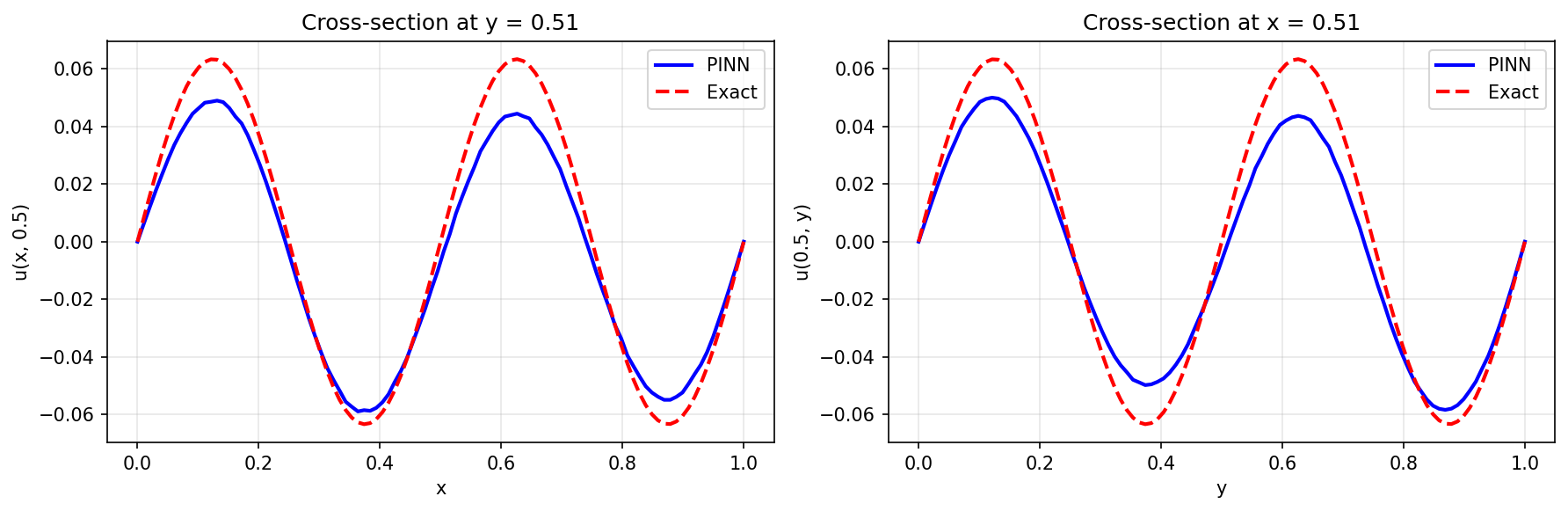
Relative L2 error:   3.506146e-02
Maximum point error: 5.202329e-02
Mean point error:    1.372658e-02
Mean PDE residual:   1.556803e+00
Boundary error:      0.000000e+00
Note the boundary error is exactly zero thanks to the hard constraint!
Visualization
Solution Comparison
Cross-Sections
Results Summary
| Metric | Value |
|---|---|
| Final Loss | 3.46 |
| Relative L2 Error | 3.51% |
| Maximum Point Error | 5.20e-02 |
| Mean Point Error | 1.37e-02 |
| Mean PDE Residual | 1.56 |
| Boundary Error | 0.0 |
| Parameters | 45,901 |
| Training Epochs | 5,000 |
Next Steps
Experiments to Try
- More modes: Try \(n = 4\) or \(n = 8\) for higher frequency solutions
- Soft constraint: Compare accuracy with
USE_HARD_CONSTRAINT = False - Different activations: Try tanh (will struggle with oscillations)
- More epochs: Train for 20,000+ epochs for lower L2 error
- Fourier features: Add input encoding for high-frequency modes
Related Examples
| Example | Level | What You'll Learn |
|---|---|---|
| Poisson Equation | Intermediate | Elliptic without wave behavior |
| Wave Equation | Intermediate | Time-dependent wave physics |
| Navier-Stokes | Advanced | Multi-output coupled PDEs |
API Reference
nnx.Linear- Linear layernnx.Optimizer- Optimizer wrapperjax.hessian- Hessian computation
Troubleshooting
Loss very high with oscillatory solution
Symptom: Loss stays at \(10^3\) or higher even after training.
Cause: tanh activation can't represent high-frequency oscillations (spectral bias).
Solution: Use sin activation as shown, or add Fourier feature encoding:
# Sin activation (recommended for oscillatory solutions)
h = jnp.sin(layer(h))

# Or Fourier features
def fourier_features(xy, k=4):
    x, y = xy[:, 0:1], xy[:, 1:2]
    features = [x, y]
    for i in range(1, k+1):
        features.extend([
            jnp.sin(2*jnp.pi*i*x), jnp.cos(2*jnp.pi*i*x),
            jnp.sin(2*jnp.pi*i*y), jnp.cos(2*jnp.pi*i*y)
        ])
    return jnp.concatenate(features, axis=-1)
Hard constraint causes training instability
Symptom: Loss fluctuates wildly or NaN values appear.
Cause: The boundary mask squashes gradients near boundaries.
Solution: Use slightly offset boundaries in mask, or use soft constraint:
# Soft boundary mask (avoids exactly zero gradients)
eps = 0.01
bc_mask = (x + eps) * (1 - x + eps) * (y + eps) * (1 - y + eps)
Solution has wrong number of oscillations
Symptom: PINN shows fewer peaks than expected.
Cause: Network capacity insufficient for given \(k_0\).
Solution: Increase network width or add more layers: