Simple SFNO for Climate Modeling
| Metadata | Value |
|---|---|
| Level | Intermediate |
| Runtime | ~3 min (CPU/GPU) |
| Prerequisites | JAX, Flax NNX, Spherical Harmonics basics |
| Format | Python + Jupyter |
| Memory | ~1 GB RAM |
Overview
The Spherical Fourier Neural Operator (SFNO) extends the FNO to spherical domains by replacing standard Fourier transforms with spherical harmonic transforms. This makes it the natural architecture for global climate and weather prediction, where data lives on the surface of a sphere rather than a flat 2D grid.
This example demonstrates training a simple SFNO on synthetic shallow water equation
data using Opifex's create_climate_sfno factory, the create_shallow_water_loader
for building datarax data loaders, and the Trainer with TrainingConfig for the
training loop. In under 50 lines of configuration code, you build, train, and evaluate
a spherical neural operator.
What You'll Learn
- Create an SFNO with the
create_climate_sfnofactory - Load climate data with
create_shallow_water_loader(datarax loaders) - Train with Opifex's
Trainer.fit()API andTrainingConfig - Evaluate and visualize climate predictions on a spherical domain
Coming from NeuralOperator (PyTorch)?
| NeuralOperator (PyTorch) | Opifex (JAX) |
|---|---|
SFNO(spectral_transform, ...) |
create_climate_sfno(in_channels=, out_channels=, lmax=, rngs=) |
| Manual spherical harmonics setup | Built-in SHT with configurable lmax |
torch.DataLoader(dataset) |
create_shallow_water_loader() (datarax) |
trainer.train(epochs=N) |
Trainer(model, config, rngs).fit(train_data) |
Manual torch.meshgrid for sphere |
Spherical grid handled internally by SFNO |
model.to(device) |
Automatic device placement via JAX |
Key differences:
- Factory function:
create_climate_sfnopre-configures spherical harmonic layers, reducing boilerplate - Explicit PRNG: Opifex uses JAX's explicit
rngs=nnx.Rngs(42)instead of global random state - XLA compilation: Automatic JIT compilation of training steps for faster throughput
- datarax data loading: Data loaders with built-in batching and train/val splitting
Files
- Python Script:
examples/neural-operators/sfno_climate_simple.py - Jupyter Notebook:
examples/neural-operators/sfno_climate_simple.ipynb
Quick Start
Run the Python Script
Run the Jupyter Notebook
Core Concepts
Spherical Fourier Neural Operator
The SFNO adapts the Fourier Neural Operator to spherical geometry. Instead of the
standard 2D FFT used in flat-domain FNOs, the SFNO uses Spherical Harmonic Transforms
(SHT) to move between spatial and spectral representations on the sphere. The lmax
parameter controls how many spherical harmonic degrees are retained, analogous to the
modes parameter in a standard FNO.
graph LR
    A["Climate Field<br/>on Sphere<br/>(lat x lon)"] --> B["Spherical Harmonics<br/>Transform (SHT)"]
    B --> C["Spectral Conv<br/>(learned weights<br/>up to degree lmax)"]
    C --> D["Inverse SHT"]
    A --> E["Local Linear<br/>(skip connection)"]
    D --> F["+ (Add)"]
    E --> F
    F --> G["Activation"]
    G --> H["Predicted Field"]

    style A fill:#e3f2fd
    style H fill:#c8e6c9
    style C fill:#fff3e0
Each spectral layer in the SFNO performs:
- SHT: Transform the input field from spatial (lat/lon) to spectral (spherical harmonic coefficients)
- Spectral convolution: Apply learned weights to the harmonic coefficients up to degree
lmax - Inverse SHT: Transform back to spatial domain
- Skip connection: Add a local linear transform of the input
- Activation: Apply nonlinearity (e.g., GELU)
Shallow Water Equations
The shallow water equations are a standard benchmark for atmospheric modeling. They describe the evolution of a fluid layer on a rotating sphere:
| Variable | Meaning | Role |
|---|---|---|
| \(h\) | Fluid height | Prognostic variable |
| \(u, v\) | Velocity components | Prognostic variables |
| \(f\) | Coriolis parameter | Rotation effect |
The synthetic data generated by create_shallow_water_loader simulates these dynamics,
producing 3-channel fields (height + two velocity components) on a latitude-longitude grid.
Implementation
Step 1: Imports and Setup
import math
import time
import warnings
from pathlib import Path

import jax
import jax.numpy as jnp
import matplotlib.pyplot as plt
import numpy as np
from flax import nnx

from opifex.core.training import Trainer, TrainingConfig
from opifex.data.loaders import create_shallow_water_loader
from opifex.neural.operators.fno.spherical import create_climate_sfno

print(f"JAX backend: {jax.default_backend()}")
print(f"JAX devices: {jax.devices()}")
Terminal Output:
======================================================================
Opifex Example: Simple Spherical FNO for Climate Modeling
======================================================================
JAX backend: gpu
JAX devices: [CudaDevice(id=0)]
Step 2: Configuration
Define experiment parameters as simple variables. No YAML or Hydra config needed.
RESOLUTION = 32
N_TRAIN = 50
N_TEST = 10
BATCH_SIZE = 4
NUM_EPOCHS = 5
LEARNING_RATE = 1e-3
SEED = 42

OUTPUT_DIR = Path("docs/assets/examples/sfno_climate_simple")
OUTPUT_DIR.mkdir(parents=True, exist_ok=True)
Terminal Output:
Resolution: 32x32
Training samples: 50, Test samples: 10
Batch size: 4, Epochs: 5
Output directory: docs/assets/examples/sfno_climate_simple
Step 3: Load Data with datarax
Opifex provides create_shallow_water_loader which generates synthetic shallow water
equation data and returns a frozen PDELoaders (with .train and .val datarax
pipelines), splitting off a validation fraction internally.
n_samples = N_TRAIN + N_TEST
loaders = create_shallow_water_loader(
    n_samples=n_samples,
    batch_size=BATCH_SIZE,
    resolution=RESOLUTION,
    val_fraction=N_TEST / n_samples,
    seed=SEED,
)

def _collect(pipeline) -> tuple[np.ndarray, np.ndarray]:
    # Batches are channels-first dicts: input/output each (batch, 3, H, W).
    inputs, outputs = [], []
    for batch in pipeline:
        inputs.append(np.asarray(batch["input"]))
        outputs.append(np.asarray(batch["output"]))
    return np.concatenate(inputs, axis=0), np.concatenate(outputs, axis=0)

x_train, y_train = _collect(loaders.train)
x_test, y_test = _collect(loaders.val)
Terminal Output:
Loading shallow water equation data via datarax...
Training data: X=(52, 3, 32, 32), Y=(52, 3, 32, 32)
Test data:     X=(12, 3, 32, 32), Y=(12, 3, 32, 32)
Data Shape Convention
The data uses channels-first format (batch, channels, height, width) where the 3
channels correspond to the shallow water equation prognostic variables (fluid height
plus two velocity components). in_channels is derived directly from
x_train.shape[1], so it is 3 for this dataset.
Step 4: Create the SFNO Model
The create_climate_sfno factory creates a Spherical FNO pre-configured for climate
modeling. It sets up spherical harmonic convolution layers with the specified maximum
degree lmax.
in_channels = x_train.shape[1]
out_channels = y_train.shape[1]

model = create_climate_sfno(
    in_channels=in_channels,
    out_channels=out_channels,
    lmax=8,
    rngs=nnx.Rngs(SEED),
)
Terminal Output:
Step 5: Train with Opifex Trainer
Instead of writing a manual training loop, use Opifex's Trainer with TrainingConfig.
The Trainer.fit() method handles batched training with JIT compilation, validation,
and progress logging.
config = TrainingConfig(
    num_epochs=NUM_EPOCHS,
    learning_rate=LEARNING_RATE,
    batch_size=BATCH_SIZE,
    verbose=True,
)

trainer = Trainer(
    model=model,
    config=config,
    rngs=nnx.Rngs(SEED),
)

trained_model, metrics = trainer.fit(
    train_data=(jnp.array(x_train), jnp.array(y_train)),
    val_data=(jnp.array(x_test), jnp.array(y_test)),
)
Terminal Output:
Setting up Trainer...
Optimizer: Adam (lr=0.001)

Starting training...
Training completed in 2.7s
Final train loss: 0.000446284597273916
Final val loss:   0.022472964599728584
Step 6: Evaluation
Evaluate the trained model on the test set by computing MSE and relative L2 error.
x_test_jnp = jnp.array(x_test)
y_test_jnp = jnp.array(y_test)

predictions = trained_model(x_test_jnp)

test_mse = float(jnp.mean((predictions - y_test_jnp) ** 2))

# Relative L2 error per sample
pred_diff = (predictions - y_test_jnp).reshape(predictions.shape[0], -1)
y_flat = y_test_jnp.reshape(y_test_jnp.shape[0], -1)
rel_l2 = float(
    jnp.mean(jnp.linalg.norm(pred_diff, axis=1) / jnp.linalg.norm(y_flat, axis=1))
)
Terminal Output:
Visualization
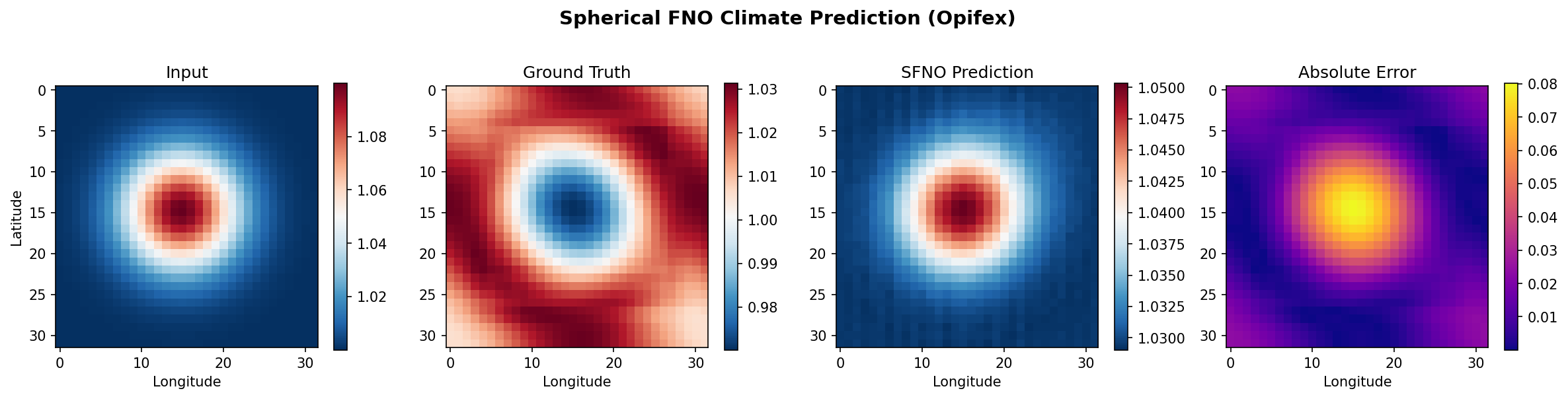
The example generates a 4-panel visualization comparing input, ground truth, SFNO prediction, and absolute error for a test sample.
fig, axes = plt.subplots(1, 4, figsize=(16, 4))
fig.suptitle("Spherical FNO Climate Prediction (Opifex)", fontsize=14, fontweight="bold")

sample_idx = 0

# Input
im0 = axes[0].imshow(x_test[sample_idx, 0], cmap="RdBu_r", aspect="equal")
axes[0].set_title("Input")
axes[0].set_xlabel("Longitude")
axes[0].set_ylabel("Latitude")
plt.colorbar(im0, ax=axes[0], shrink=0.8)

# Ground truth
im1 = axes[1].imshow(y_test[sample_idx, 0], cmap="RdBu_r", aspect="equal")
axes[1].set_title("Ground Truth")
axes[1].set_xlabel("Longitude")
plt.colorbar(im1, ax=axes[1], shrink=0.8)

# Prediction
pred_np = np.array(predictions[sample_idx, 0])
im2 = axes[2].imshow(pred_np, cmap="RdBu_r", aspect="equal")
axes[2].set_title("SFNO Prediction")
axes[2].set_xlabel("Longitude")
plt.colorbar(im2, ax=axes[2], shrink=0.8)

# Absolute error
error = np.abs(pred_np - y_test[sample_idx, 0])
im3 = axes[3].imshow(error, cmap="plasma", aspect="equal")
axes[3].set_title("Absolute Error")
axes[3].set_xlabel("Longitude")
plt.colorbar(im3, ax=axes[3], shrink=0.8)

plt.tight_layout()
plt.savefig(OUTPUT_DIR / "sfno_results.png", dpi=150, bbox_inches="tight")
plt.close()
Terminal Output:
Generating visualization...
Visualization saved to docs/assets/examples/sfno_climate_simple/sfno_results.png
Results Summary
| Metric | Value | Notes |
|---|---|---|
| Final Train Loss | 0.00045 | After 5 epochs |
| Final Val Loss | 0.0225 | On held-out validation set |
| Test MSE | 0.000339 | Mean squared error |
| Test Relative L2 | 0.030804 | L2 relative error |
| Training Time | 2.7s | On single GPU |
| Resolution | 32x32 | Latitude x longitude grid |
| Spherical Modes | lmax=8 | Spherical harmonic degree |
What We Achieved
- Trained a Spherical FNO on synthetic shallow water equation data in under 3 seconds
- Achieved a relative L2 error of ~0.031 with only 5 epochs and 52 training samples
- Demonstrated the full pipeline: data loading (datarax), model creation (factory), training (Trainer), evaluation, and visualization
- Used
create_climate_sfnofactory to set up spherical harmonic layers with minimal configuration
Interpretation
The SFNO captures the global structure of the shallow water solution through spectral
convolutions in spherical harmonic space. With only 5 training epochs and 52 samples,
the relative L2 error of ~0.031 is reasonable for this quick demonstration. The error
map shows that prediction accuracy is relatively uniform across the spatial domain.
Increasing epochs, training samples, and lmax will improve accuracy further.
Next Steps
Experiments to Try
- Increase
lmax: Trylmax=16orlmax=32for higher spectral resolution and finer spatial detail - More training data: Increase
N_TRAINto 500+ samples for better generalization - Longer training: Train for 50-100 epochs to observe convergence behavior
- Mixed precision: Use
jnp.bfloat16for 40-50% memory reduction on larger resolutions - Conservation analysis: Check whether the SFNO preserves mass and energy (see full SFNO example)
Related Examples
| Example | Level | What You'll Learn |
|---|---|---|
| SFNO Climate Full | Advanced | Conservation-aware loss, energy/mass analysis, production patterns |
| FNO Darcy Full | Intermediate | Full FNO training pipeline on flat 2D domains |
| UNO Darcy Framework | Intermediate | Multi-resolution U-shaped neural operator architecture |
| Grid Embeddings | Beginner | Spatial coordinate injection for neural operators |
| Neural Operator Benchmark | Advanced | Cross-architecture performance comparison |
API Reference
create_climate_sfno- SFNO factory for climate modelingcreate_shallow_water_loader- datarax shallow water data loaderTrainer- Training orchestrationTrainingConfig- Training hyperparameters
Troubleshooting
Low accuracy after training
Symptom: Relative L2 error remains high (> 0.5) after training.
Cause: Too few epochs or training samples for the model to learn the operator mapping.
Solution: Increase both training samples and epochs:
OOM during training at high resolution
Symptom: jaxlib.xla_extension.XlaRuntimeError: RESOURCE_EXHAUSTED
Cause: High RESOLUTION or lmax values exceed available GPU memory.
Solution: Reduce resolution or enable gradient checkpointing:
RESOLUTION = 32   # Start small, scale up
BATCH_SIZE = 2    # Reduce batch size

# Or enable gradient checkpointing via TrainingConfig
config = TrainingConfig(gradient_checkpointing=True, gradient_checkpoint_policy="dots_saveable")
NaN in training loss
Symptom: Loss becomes nan after a few epochs.
Cause: Learning rate too high for spherical harmonic operations.
Solution: Reduce learning rate or add gradient clipping:
Data shape mismatch
Symptom: Shape error when passing data to the model.
Cause: create_shallow_water_loader yields channels-first 4D batches
(batch, 3, height, width), and in_channels must match x_train.shape[1] (3 for
the shallow water fields). A mismatch usually means custom data with a different
channel count or a missing channel axis.
Solution: Derive the channel count from the data and add a channel axis if your custom arrays are 3D: