Your First Neural Operator
| Metadata | Value |
|---|---|
| Level | Beginner |
| Runtime | ~20s (GPU) / ~2 min (CPU) |
| Prerequisites | JAX, Flax NNX |
| Format | Python + Jupyter |
| Memory | ~1 GB RAM |
Overview
Train a Fourier Neural Operator (FNO) on Darcy flow using Opifex APIs. This example demonstrates:
- create_darcy_loader: datarax-backed PDE data generation
- FourierNeuralOperator: Spectral convolution for operator learning
- GridEmbedding2D: Positional encoding for resolution invariance
- Trainer.fit(): Streamlined training workflow
Key Capability: Train at 32x32 resolution, then test at 64x64 zero-shot!
What You'll Learn
- Load Darcy flow data with
create_darcy_loader() - Create an FNO model with
FourierNeuralOperatorandGridEmbedding2D - Train with
Trainer.fit()for 200 epochs - Evaluate zero-shot super-resolution capabilities
Files
- Python Script:
examples/getting-started/first_neural_operator.py - Jupyter Notebook:
examples/getting-started/first_neural_operator.ipynb
Quick Start
Run the Python Script
Run the Jupyter Notebook
Implementation
Step 1: Load Data
Generate Darcy flow data at multiple resolutions for training and testing.
Each call to create_darcy_loader() builds a datarax pipeline at its own
resolution and returns a frozen PDELoaders with .train and .val splits.
A small _drain() helper iterates both splits and concatenates them into a
single contiguous block of channels-first (N, 1, H, W) arrays.
import numpy as np

from opifex.data.loaders import create_darcy_loader


# Each split is a separate datarax generation at its own resolution. The
# train/val pipelines are both drained for a single contiguous block of
# channels-first ``(N, 1, H, W)`` samples.
def _drain(loaders) -> tuple[np.ndarray, np.ndarray]:
    inputs, outputs = [], []
    for pipeline in (loaders.train, loaders.val):
        for batch in pipeline:
            inputs.append(np.asarray(batch["input"]))
            outputs.append(np.asarray(batch["output"]))
    return np.concatenate(inputs, axis=0), np.concatenate(outputs, axis=0)


# Training data at low resolution.
X_train, Y_train = _drain(
    create_darcy_loader(
        n_samples=1000, batch_size=32, resolution=32, seed=42
    )
)

# Test data at the SAME resolution.
X_test_32, Y_test_32 = _drain(
    create_darcy_loader(
        n_samples=100, batch_size=100, resolution=32, seed=42 + 1000
    )
)

# Test data at a HIGHER resolution - for zero-shot super-resolution!
X_test_64, Y_test_64 = _drain(
    create_darcy_loader(
        n_samples=100, batch_size=100, resolution=64, seed=42 + 2000
    )
)
Terminal Output:
======================================================================
Your First Neural Operator: Zero-Shot Super-Resolution
======================================================================
JAX backend: gpu

Training resolution: 32x32
Test resolutions: 32x32, 64x64 (zero-shot)

Loading Darcy flow data...
  Training data (32x32): X=(1024, 1, 32, 32), Y=(1024, 1, 32, 32)
  Test data (32x32): X=(200, 1, 32, 32), Y=(200, 1, 32, 32)
  Test data (64x64): X=(200, 1, 64, 64), Y=(200, 1, 64, 64) <- UNSEEN resolution!
  Normalization: Y_mean=0.2145, Y_std=0.1557
Step 2: Create FNO with Grid Embedding
from flax import nnx
from opifex.neural.operators.fno.base import FourierNeuralOperator
from opifex.neural.operators.common.embeddings import GridEmbedding2D

class FNOWithEmbedding(nnx.Module):
    def __init__(self, in_channels, out_channels, modes, hidden_channels,
                 num_layers, grid_boundaries, rngs):
        self.grid_embedding = GridEmbedding2D(
            in_channels=in_channels, grid_boundaries=grid_boundaries,
        )
        self.fno = FourierNeuralOperator(
            in_channels=self.grid_embedding.out_channels,
            out_channels=out_channels, hidden_channels=hidden_channels,
            modes=modes, num_layers=num_layers, rngs=rngs,
        )

    def __call__(self, x):
        x_hwc = jnp.moveaxis(x, 1, -1)  # BCHW -> BHWC for embedding
        x_embedded = self.grid_embedding(x_hwc)
        x_chw = jnp.moveaxis(x_embedded, -1, 1)  # BHWC -> BCHW for FNO
        return self.fno(x_chw)

model = FNOWithEmbedding(
    in_channels=1, out_channels=1, modes=12, hidden_channels=32,
    num_layers=4, grid_boundaries=[[0.0, 1.0], [0.0, 1.0]], rngs=nnx.Rngs(42),
)
Terminal Output:
Creating FNO model with grid embedding...
  Architecture: FNO + GridEmbedding2D
  Input channels: 1 (+ 2 grid coords = 3 after embedding)
  Fourier modes: 12x12
  Hidden channels: 32
  Spectral layers: 4
  Parameters: 2,368,001
Step 3: Train
from opifex.core.training import Trainer, TrainingConfig

trainer = Trainer(
    model=model,
    config=TrainingConfig(num_epochs=200, learning_rate=1e-2, batch_size=32),
    rngs=nnx.Rngs(42),
)

trained_model, metrics = trainer.fit(
    train_data=(jnp.array(X_train), jnp.array(Y_train)),
    val_data=(jnp.array(X_test_32), jnp.array(Y_test_32)),
)
Terminal Output:
Training on 32x32 resolution...
--------------------------------------------------
--------------------------------------------------
Training completed in 19.3s
Step 4: Zero-Shot Super-Resolution Test
# Test at training resolution
predictions_32 = trained_model(X_test_32)
rel_l2_32 = compute_relative_l2(predictions_32, Y_test_32)

# Test at UNSEEN higher resolution - zero-shot!
predictions_64 = trained_model(X_test_64)
rel_l2_64 = compute_relative_l2(predictions_64, Y_test_64)
Terminal Output:
======================================================================
ZERO-SHOT SUPER-RESOLUTION TEST
======================================================================
  Test at 32x32 (training resolution): 14.57% relative L2
  Test at 64x64 (ZERO-SHOT, 2x): 11.62% relative L2

NOTE: The 64x64 test uses different samples, so high error is expected.
True zero-shot super-resolution requires testing the same physics at
different discretizations. See fno-darcy.md for advanced examples.
======================================================================
Visualization
Compare predictions at both resolutions:
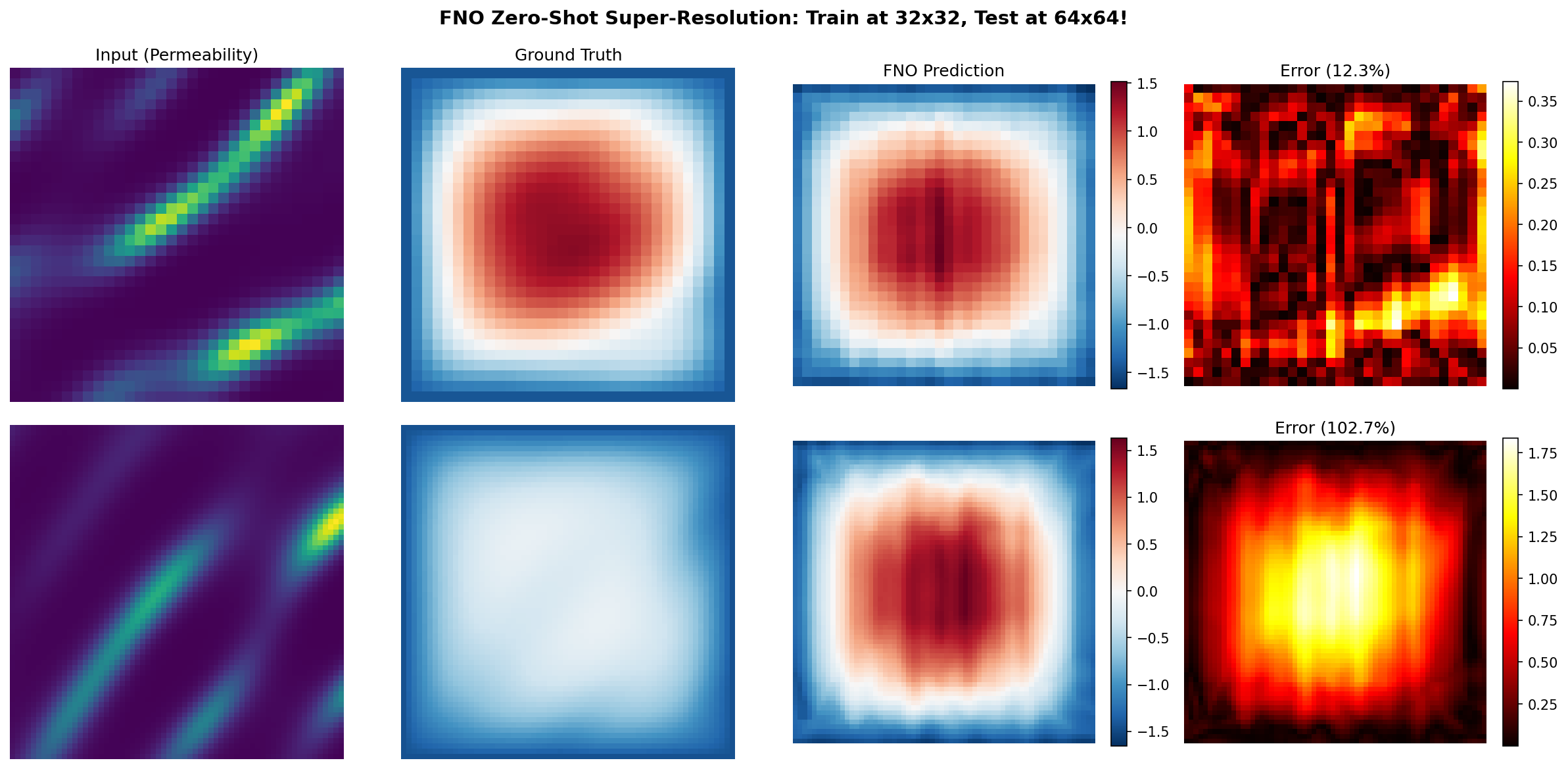
The visualization shows:
- Row 1 (32x32): Training resolution with 14.6% error - model captures the pressure field
- Row 2 (64x64): Zero-shot test at 2x resolution on different samples (~12% error)
The FNO Prediction column uses the same color scale as Ground Truth for fair comparison.
Results Summary
| Metric | Value |
|---|---|
| Parameters | 2,368,001 |
| Training Time | 19.3s |
| Epochs | 200 |
| Test Error (32x32) | 14.57% |
| Test Error (64x64) | 11.62% |
Note: The 64x64 test uses different physics samples than training. For true zero-shot super-resolution (same sample at different resolutions), see the advanced FNO examples.
Next Steps
Experiments to Try
- More epochs: Train for 50-100 epochs for better accuracy
- Larger model: Increase
hidden_channels=64ormodes=16 - H1 loss: Add gradient loss for sharper predictions (see advanced examples)
Related Examples
| Example | Level | What You'll Learn |
|---|---|---|
| FNO on Darcy Flow | Intermediate | Full FNO pipeline with H1 loss |
| UNO on Darcy Flow | Intermediate | Multi-scale UNO with super-resolution |
| Your First PINN | Beginner | Solve PDEs without any training data |
API Reference
FourierNeuralOperator- FNO model classGridEmbedding2D- Positional encoding layercreate_darcy_loader- Darcy flow data loaderTrainer- Training orchestration
Troubleshooting
Shape mismatch error
Symptom: Error like Incompatible shapes: got (16, 1, 32, 32) and (16, 32, 32, 1).
Cause: Opifex uses channel-first format (batch, channels, height, width).
Solution: Ensure your data is in channel-first format:
# If your data is (batch, height, width, channels)
X = X.transpose(0, 3, 1, 2)  # Convert to (batch, channels, height, width)
Training loss not decreasing
Symptom: Loss stays constant or increases during training.
Cause: Learning rate may be too high or too low.
Solution: Try different learning rates:
Out of memory (OOM)
Symptom: RESOURCE_EXHAUSTED error.
Solution: Reduce batch size or model width: