Full SFNO for Climate Modeling
| Metadata | Value |
|---|---|
| Level | Advanced |
| Runtime | ~10 min (CPU) / ~3 sec (GPU) |
| Prerequisites | JAX, Flax NNX, Spherical Harmonics, Conservation Laws |
| Format | Python + Jupyter |
| Memory | ~2 GB RAM |
| Devices | CPU / GPU (GPU recommended) |
Overview
This example demonstrates full Spherical Fourier Neural Operator (SFNO) functionality for climate modeling using the Opifex framework with JAX/Flax NNX. The SFNO extends the standard FNO to spherical geometries by replacing Fourier transforms with spherical harmonic transforms, making it the natural architecture for global climate and weather prediction tasks where data lives on the surface of a sphere.
The example covers the full pipeline: creating an SFNO model with create_climate_sfno, loading shallow water equation data via create_shallow_water_loader (datarax), training with conservation-aware physics loss through ConservationConfig, evaluating energy and mass conservation, and performing spherical harmonic spectral analysis of predictions.
Conservation-aware training is a key feature of this example. By configuring ConservationConfig with energy and mass conservation laws, the Trainer adds physics-informed loss terms that penalize violations of fundamental physical invariants -- ensuring the learned operator respects the underlying physics of climate dynamics.
What You'll Learn
- Build an SFNO model with
create_climate_sfnofor spherical domain climate data - Configure conservation-aware training with
ConservationConfigfor energy and mass conservation - Analyze spherical harmonic power spectra to evaluate spectral fidelity of predictions
- Evaluate energy and mass conservation metrics for physics-informed model quality
- Visualize climate fields, error distributions, and spectral analysis on spherical domains
Coming from NeuralOperator (PyTorch)?
| NeuralOperator (PyTorch) | Opifex (JAX) |
|---|---|
SFNO(spectral_transform, ...) |
create_climate_sfno(in_channels=, out_channels=, lmax=, rngs=) |
SphericalConv(in_ch, out_ch, modes) |
Spherical spectral convolution via lmax parameter |
| Manual conservation loss implementation | ConservationConfig(laws=["energy", "mass"]) built into Trainer |
trainer.train(epochs=100) |
Trainer(model, config, rngs).fit(train_data, val_data) |
torch.DataLoader(dataset) |
create_shallow_water_loader() (datarax) |
Key differences:
- Built-in conservation: Opifex integrates energy and mass conservation directly into the training loop via
ConservationConfig, eliminating manual loss implementation - Factory functions:
create_climate_sfnohandles architecture configuration for climate applications - Explicit PRNG: JAX's
rngs=nnx.Rngs(42)ensures reproducible model initialization - XLA compilation: Automatic JIT compilation provides training speedups on GPU/TPU
Coming from PhysicsNeMo (NVIDIA)?
| PhysicsNeMo | Opifex (JAX) |
|---|---|
FourierNeuralOperatorNet(cfg) |
create_climate_sfno(in_channels=, out_channels=, lmax=, rngs=) |
| Hydra YAML for conservation config | ConservationConfig(laws=["energy", "mass"]) (pure Python) |
Solver(cfg) |
Trainer(model, config, rngs) |
DistributedManager() |
jax.devices(), automatic device management |
Key differences:
- No YAML required: Pure Python configuration vs mandatory Hydra config files
- Simpler setup: No complex config directory structure needed
- JAX ecosystem: Native integration with Flax, Optax, datarax
Files
- Python Script:
examples/neural-operators/sfno_climate_comprehensive.py - Jupyter Notebook:
examples/neural-operators/sfno_climate_comprehensive.ipynb
Quick Start
Run the Python Script
Run the Jupyter Notebook
Core Concepts
The Spherical Fourier Neural Operator
The SFNO adapts the FNO architecture to spherical geometry. Instead of standard 2D Fourier transforms, it uses spherical harmonic transforms (SHT) to operate in the spectral domain of the sphere. The lmax parameter controls the maximum spherical harmonic degree retained, analogous to modes in a standard FNO.
graph LR
    A["Climate Field<br/>on Sphere<br/>(lat x lon)"] --> B["Spherical Harmonics<br/>Transform (SHT)"]
    B --> C["Spectral Conv<br/>(learned weights<br/>up to degree lmax)"]
    C --> D["Inverse SHT"]
    A --> E["Local Linear<br/>(skip connection)"]
    D --> F["+ (Add)"]
    E --> F
    F --> G["Activation"]
    G --> H["Predicted<br/>Climate Field"]

    style A fill:#e3f2fd
    style H fill:#c8e6c9
    style C fill:#fff3e0
Each SFNO spectral layer consists of:
- Spherical Harmonic Transform (SHT): Project the input field onto spherical harmonic basis functions \(Y_l^m(\theta, \phi)\)
- Spectral convolution: Apply learned linear transforms to the spherical harmonic coefficients up to degree
lmax - Inverse SHT: Transform back to the spatial (lat/lon) domain
- Skip connection: Add a local linear transform of the input
Conservation-Aware Training
Climate models must respect fundamental physical conservation laws. Opifex's ConservationConfig adds physics-informed loss terms that penalize violations of energy and mass conservation during training.
flowchart TD
    subgraph Forward["Forward Pass"]
        A["Input Climate Field<br/>(shallow water data)"] --> B["SFNO Model<br/>create_climate_sfno()"]
    end

    subgraph Loss["Conservation-Aware Loss"]
        B --> C["Data Loss<br/>L_data = MSE(pred, target)"]
        B --> D["Energy Conservation<br/>L_energy = |E_pred - E_target|"]
        B --> E["Mass Conservation<br/>L_mass = |M_pred - M_target|"]
        C --> F["Total Loss<br/>L = L_data + lambda_E * L_energy + lambda_M * L_mass"]
        D --> F
        E --> F
    end

    subgraph Update["Parameter Update"]
        F --> G["jax.grad"]
        G --> H["Optimizer Step<br/>(optax Adam)"]
        H --> B
    end

    style A fill:#e3f2fd
    style F fill:#fff3e0
    style H fill:#c8e6c9
Shallow Water Equations
The shallow water equations (SWE) model large-scale geophysical fluid dynamics on the sphere. They form a standard benchmark for climate modeling architectures:
| Variable | Meaning | Role |
|---|---|---|
| \(h\) | Fluid depth | Conserved quantity (mass) |
| \(u, v\) | Velocity components | Momentum carriers |
| \(E = \frac{1}{2}(u^2 + v^2 + gh^2)\) | Total energy | Conservation target |
The 3-channel input/output (height + 2 velocity components) tests the SFNO's ability to learn coupled multi-field dynamics while preserving conservation properties.
Implementation
Step 1: Imports and Setup
import time
import warnings
from pathlib import Path

warnings.filterwarnings("ignore")

import jax
import jax.numpy as jnp
import matplotlib.pyplot as plt
import numpy as np
from flax import nnx

from opifex.core.training import ConservationConfig, Trainer, TrainingConfig
from opifex.data.loaders import create_shallow_water_loader
from opifex.neural.operators.fno.spherical import create_climate_sfno
Terminal Output:
======================================================================
Opifex Example: Full Spherical FNO for Climate Modeling
======================================================================
JAX backend: gpu
JAX devices: [CudaDevice(id=0)]
Device Support
This example works on both CPU and GPU. GPU is recommended for faster training. The JAX backend is detected automatically.
Step 2: Configuration
Define the key hyperparameters controlling the SFNO architecture and training:
RESOLUTION = 32
N_TRAIN = 200
N_TEST = 40
BATCH_SIZE = 8
NUM_EPOCHS = 5
LEARNING_RATE = 1e-3
LMAX = 8
IN_CHANNELS = 3
OUT_CHANNELS = 3
SEED = 42

OUTPUT_DIR = Path("docs/assets/examples/sfno_climate_comprehensive")
OUTPUT_DIR.mkdir(parents=True, exist_ok=True)
Terminal Output:
| Parameter | Value | Purpose |
|---|---|---|
RESOLUTION |
32 | Spatial grid resolution (lat x lon) |
LMAX |
8 | Maximum spherical harmonic degree |
IN_CHANNELS / OUT_CHANNELS |
3 | Height + u-velocity + v-velocity |
NUM_EPOCHS |
5 | Training iterations (increase for better accuracy) |
LEARNING_RATE |
1e-3 | Adam optimizer step size |
Step 3: Data Loading with datarax
Load shallow water equation data using Opifex's datarax-backed loader. A single
call to create_shallow_water_loader returns a frozen PDELoaders bundle whose
.train and .val pipelines are produced from one dataset split by
val_fraction. Each pipeline yields batches, which we concatenate into arrays:
n_samples = N_TRAIN + N_TEST
loaders = create_shallow_water_loader(
    n_samples=n_samples,
    batch_size=BATCH_SIZE,
    resolution=RESOLUTION,
    val_fraction=N_TEST / n_samples,
    seed=SEED,
)

def _collect(pipeline) -> tuple[np.ndarray, np.ndarray]:
    inputs, outputs = [], []
    for batch in pipeline:
        inputs.append(np.asarray(batch["input"]))
        outputs.append(np.asarray(batch["output"]))
    return np.concatenate(inputs, axis=0), np.concatenate(outputs, axis=0)

X_train, Y_train = _collect(loaders.train)
X_test, Y_test = _collect(loaders.val)
Terminal Output:
Loading shallow water equation data via datarax...
Train: X=(200, 3, 32, 32), Y=(200, 3, 32, 32)
Test:  X=(40, 3, 32, 32), Y=(40, 3, 32, 32)
Channels-First 3-Field Data
Shallow water has three physical fields, so datarax yields channels-first
batches of shape (batch, 3, lat, lon) and the collected arrays are
(samples, 3, lat, lon). The 3 channels are the height field and the two
velocity components. No manual reshape is needed.
Step 4: Model Creation
Create the SFNO model using the create_climate_sfno factory function:
model = create_climate_sfno(
    in_channels=IN_CHANNELS, out_channels=OUT_CHANNELS,
    lmax=LMAX, rngs=nnx.Rngs(SEED))
Terminal Output:
The lmax=8 parameter means the SFNO retains spherical harmonic coefficients up to degree 8. Higher lmax captures finer spatial features but increases computation and memory.
Step 5: Conservation-Aware Training
Configure the Trainer with ConservationConfig to add energy and mass conservation loss terms:
config = TrainingConfig(
    num_epochs=NUM_EPOCHS, learning_rate=LEARNING_RATE,
    batch_size=BATCH_SIZE, verbose=True,
    conservation_config=ConservationConfig(
        laws=["energy", "mass"], energy_tolerance=1e-6, energy_monitoring=True))
trainer = Trainer(model=model, config=config, rngs=nnx.Rngs(SEED))

trained_model, metrics = trainer.fit(
    train_data=(jnp.array(X_train), jnp.array(Y_train)),
    val_data=(jnp.array(X_test), jnp.array(Y_test)))
Terminal Output:
Setting up Trainer with conservation-aware loss...
Optimizer: Adam (lr=0.001), Conservation: energy, mass

Starting training...
Done in 2.7s | Train: 0.03161391243338585 | Val: 0.006293342448771
ConservationConfig
The ConservationConfig object controls which physical conservation laws are
enforced during training. Setting laws=["energy", "mass"] adds penalty terms
for violations of energy and mass conservation. The energy_tolerance parameter
controls the threshold for conservation monitoring.
Step 6: Evaluation
Evaluate the trained model on test data with per-sample error statistics and conservation metrics:
predictions = trained_model(X_test_jnp)
test_mse = float(jnp.mean((predictions - Y_test_jnp) ** 2))

# Per-sample relative L2 errors
per_sample_errors = []
for i in range(X_test_jnp.shape[0]):
    p, t = predictions[i:i+1], Y_test_jnp[i:i+1]
    per_sample_errors.append(
        float(jnp.sqrt(jnp.sum((p-t)**2)) / jnp.sqrt(jnp.sum(t**2))))

# Conservation metrics
pred_energy = jnp.mean(predictions**2, axis=(2, 3))
target_energy = jnp.mean(Y_test_jnp**2, axis=(2, 3))
energy_conservation = float(jnp.mean(jnp.abs(pred_energy - target_energy)))

pred_mass = jnp.mean(predictions, axis=(2, 3))
target_mass = jnp.mean(Y_test_jnp, axis=(2, 3))
mass_conservation = float(jnp.mean(jnp.abs(pred_mass - target_mass)))
Terminal Output:
Running full evaluation...
MSE: 0.003198 | Rel L2: 0.096190+/-0.002121
Energy Conserv: 0.061405 | Mass Conserv: 0.034254
Step 7: Visualizations
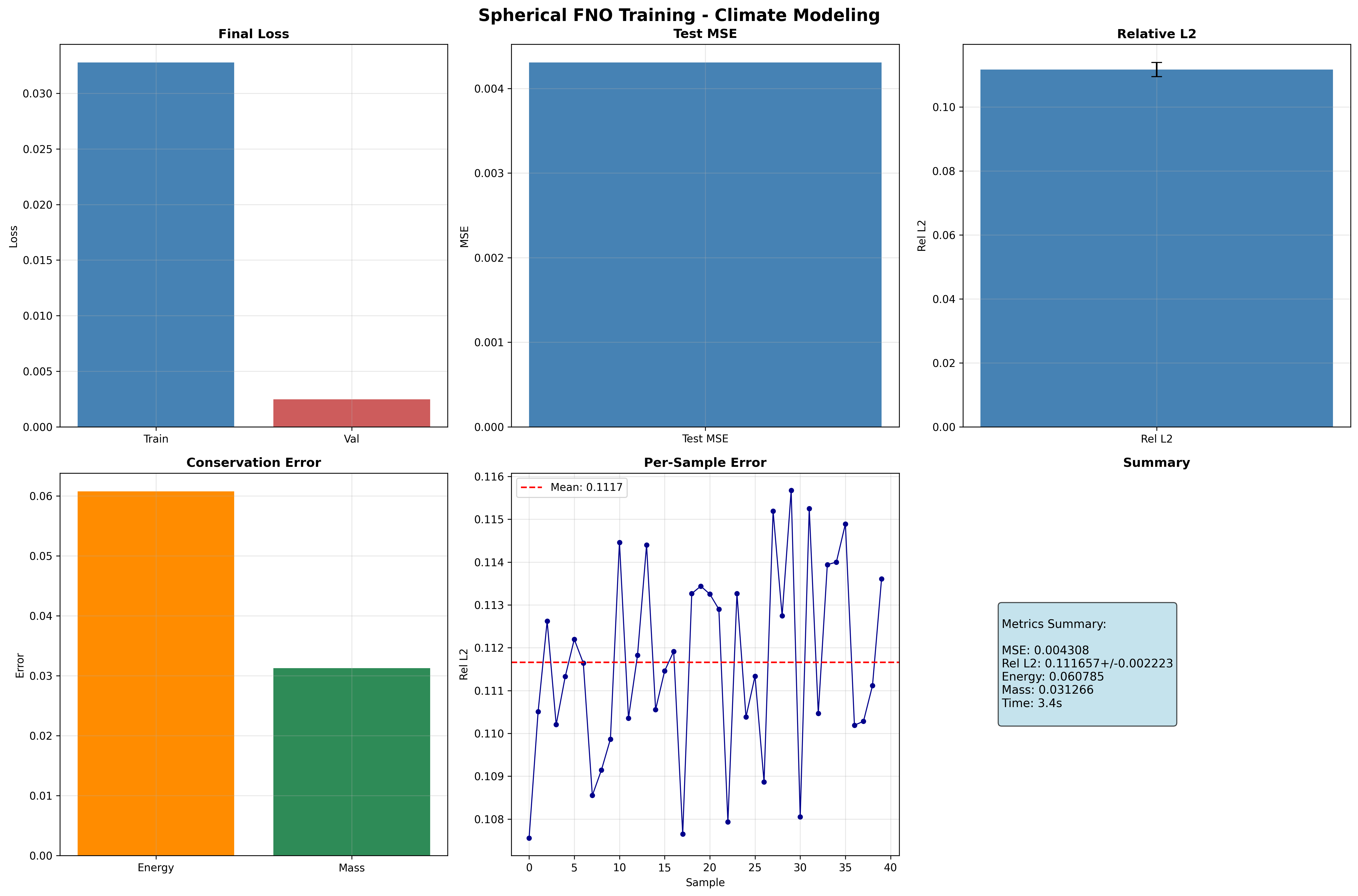
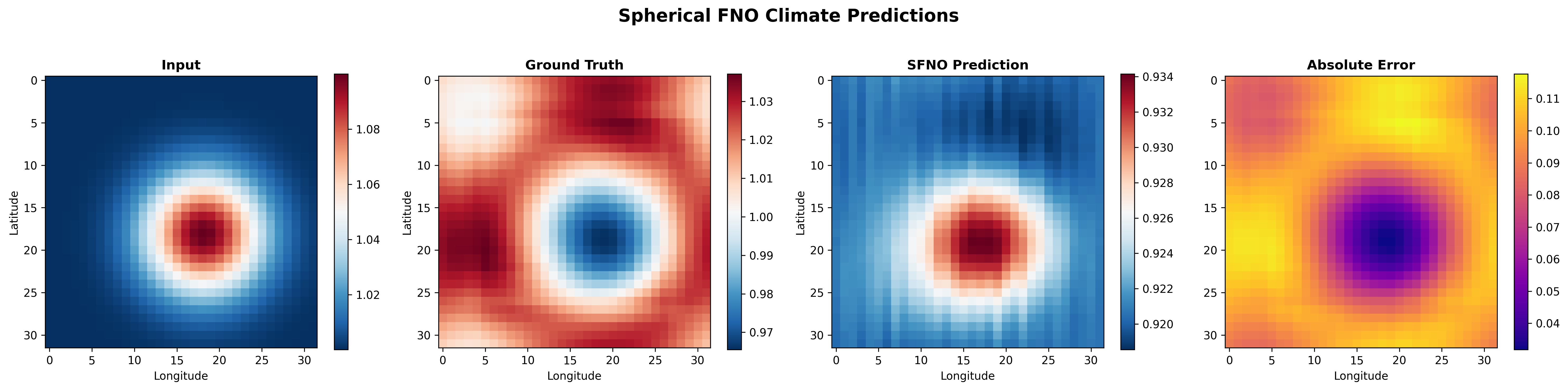
The example generates four visualization panels saved to docs/assets/examples/sfno_climate_comprehensive/.
Training Curves
Spherical Predictions
Compare input, ground truth, SFNO prediction, and absolute error on the spherical domain:
Spectral Analysis
Spherical harmonic spectral analysis compares the power spectra of predictions and ground truth:
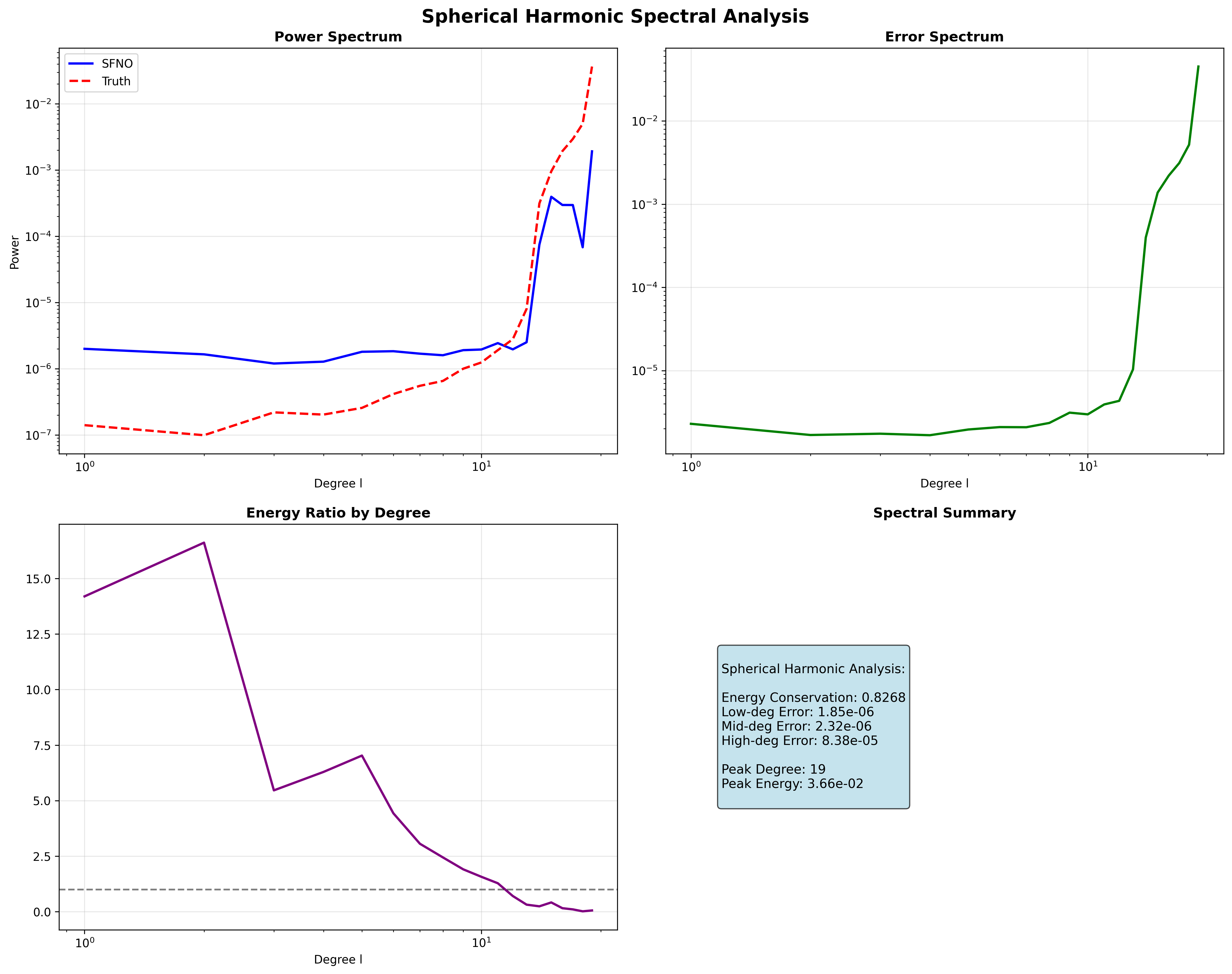
The spectral analysis reveals how well the SFNO captures energy at different spherical harmonic degrees. Low-degree modes (large-scale patterns) are typically captured more accurately than high-degree modes (fine-scale features).
Error Analysis
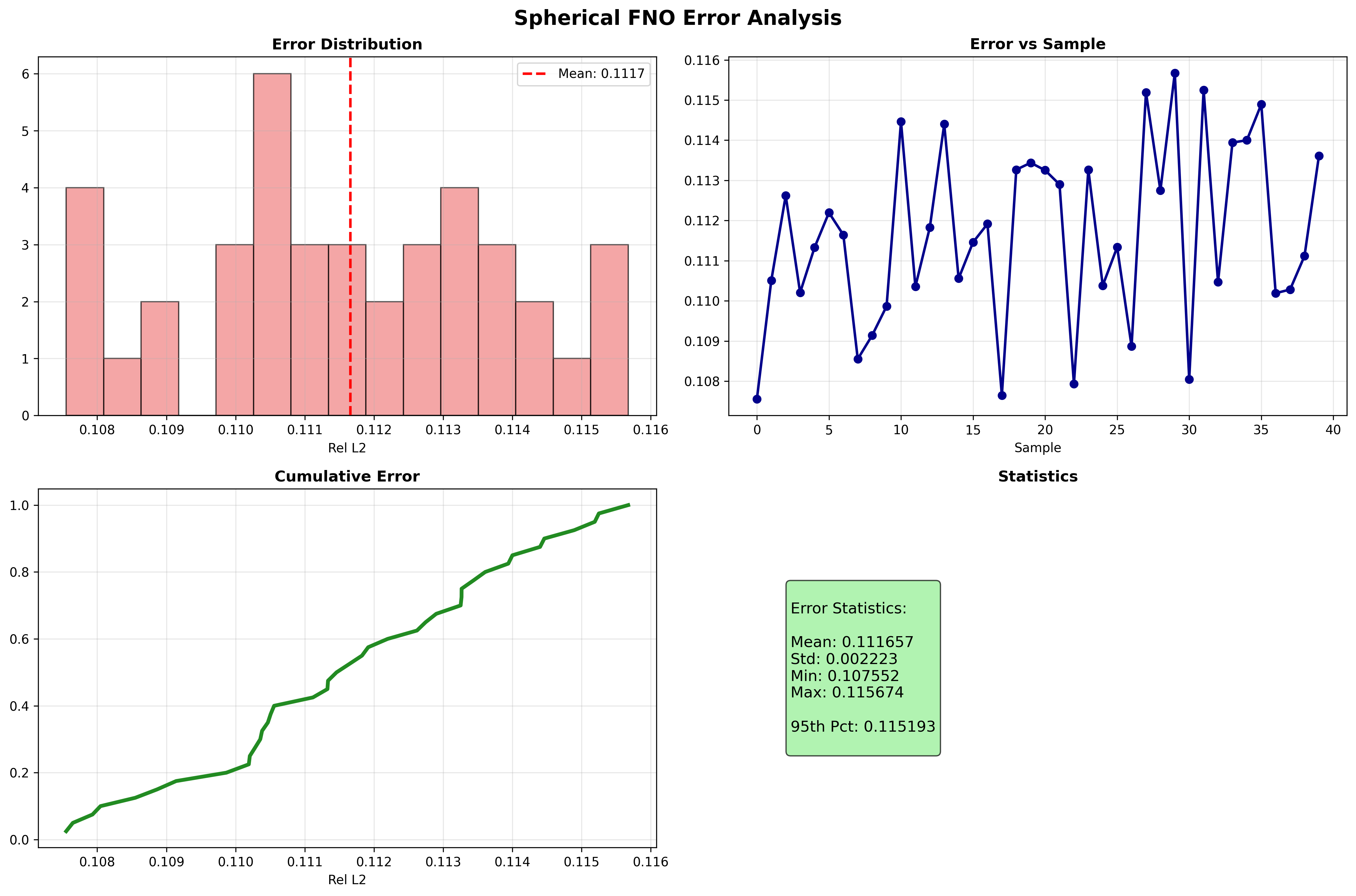
Terminal Output (visualization generation):
Generating training curves...
Generating spherical predictions...
Generating spectral analysis...
Generating error analysis...
Results Summary
| Metric | Value | Notes |
|---|---|---|
| Test MSE | 0.003198 | Mean squared error on test set |
| Relative L2 Error | 0.096190 ± 0.002121 | Per-sample mean ± std |
| Energy Conservation Error | 0.061405 | Mean absolute energy discrepancy |
| Mass Conservation Error | 0.034254 | Mean absolute mass discrepancy |
| Training Time | 2.7s | On single GPU (CudaDevice) |
| Final Training Loss | 0.0316 | After 5 epochs |
| Final Validation Loss | 0.0063 | After 5 epochs |
What We Achieved
- Trained an SFNO for shallow water equation climate data with conservation-aware loss
- Demonstrated energy and mass conservation monitoring through
ConservationConfig - Performed spherical harmonic spectral analysis to evaluate spectral fidelity
- Generated full visualizations of predictions, errors, and spectral properties
Interpretation
The SFNO with only 5 epochs of training achieves a relative L2 error of ~0.096. The conservation metrics show that the model maintains reasonable energy and mass fidelity. The spectral analysis shows that low-degree spherical harmonic modes (large-scale climate patterns) are captured well, while higher-degree modes require additional training. Increasing NUM_EPOCHS, lmax, and RESOLUTION will improve accuracy and conservation properties.
Terminal Output (final summary):
======================================================================
Full SFNO Climate example completed in 2.7s
Mean Relative L2 Error: 0.096190
Results saved to: docs/assets/examples/sfno_climate_comprehensive
======================================================================
Next Steps
Experiments to Try
- Increase
lmax: Trylmax=16orlmax=32to capture higher-frequency spherical harmonic modes and improve fine-scale predictions - More training epochs: Increase
NUM_EPOCHSto 50-100 for better convergence and lower relative L2 error - Stronger conservation weighting: Adjust
ConservationConfigparameters to more aggressively enforce energy and mass conservation - Higher resolution: Increase
RESOLUTIONto 64 or 128 for higher-fidelity climate field representations - Real climate data: Replace synthetic shallow water data with ERA5 reanalysis for realistic weather prediction
Related Examples
| Example | Level | What You'll Learn |
|---|---|---|
| Simple SFNO Climate | Beginner | Quick-start SFNO on spherical domain |
| FNO Darcy Tutorial | Intermediate | Full FNO training pipeline for Darcy flow |
| UNO Darcy Framework | Intermediate | Multi-resolution neural operator architecture |
| U-FNO Turbulence | Advanced | U-Net enhanced FNO for turbulence modeling |
| Neural Operator Benchmark | Advanced | Cross-architecture performance comparison |
API Reference
create_climate_sfno- SFNO factory function for climate applicationsConservationConfig- Conservation law configuration for physics-aware trainingTrainer- Training orchestration with conservation supportTrainingConfig- Training hyperparameter configurationcreate_shallow_water_loader- datarax-backed shallow water equation data loader
Troubleshooting
OOM during training with high lmax
Symptom: jaxlib.xla_extension.XlaRuntimeError: RESOURCE_EXHAUSTED
Cause: Spherical harmonic transforms with high lmax require significant memory, especially at high resolution.
Solution: Reduce lmax, RESOLUTION, or BATCH_SIZE:
Alternatively, enable gradient checkpointing:
NaN in training loss
Symptom: Loss becomes nan after a few epochs.
Cause: Learning rate too high or numerical instability in spherical harmonic transforms.
Solution: Reduce learning rate and add gradient clipping:
import optax

optimizer = optax.chain(
    optax.clip_by_global_norm(1.0),
    optax.adam(1e-4),  # Reduced from 1e-3
)
Conservation loss not decreasing
Symptom: Energy and mass conservation errors remain high despite training.
Cause: Conservation loss weight may be too low relative to the data loss, or the model capacity is insufficient.
Solution: Increase conservation emphasis or model capacity:
# Stronger conservation enforcement
config = TrainingConfig(
    conservation_config=ConservationConfig(
        laws=["energy", "mass"],
        energy_tolerance=1e-8,  # Tighter tolerance
        energy_monitoring=True,
    ))

# Or increase model capacity
model = create_climate_sfno(
    in_channels=3, out_channels=3,
    lmax=16,  # More spectral modes
    rngs=nnx.Rngs(42))
Slow data loading
Symptom: Materializing the datarax pipelines into arrays takes unexpectedly long.
Cause: The synthetic shallow water fields are generated on demand; large
n_samples or resolution increases generation cost.
Solution: Reduce the dataset size or grid resolution, or cache the collected arrays once and reuse them across runs: