Darcy Flow Spectral Analysis
| Metadata | Value |
|---|---|
| Level | Advanced |
| Runtime | ~3 min (CPU) |
| Prerequisites | JAX, FFT/Spectral Analysis basics |
| Format | Python + Jupyter |
Overview
Spectral analysis reveals the frequency content of Darcy flow fields, which is critical for understanding how neural operators (especially FNO) represent solutions. FNO operates in Fourier space, so understanding the spectral properties of your data directly informs architecture choices like mode truncation and hidden channel width.
This example computes 2D power spectral densities, energy distributions across
frequency bands, dominant Fourier modes, and spectral slopes for Darcy flow fields
generated by Opifex's vmapped generate_darcy data generator.
What You'll Learn
- Compute 2D power spectral density with
compute_power_spectrum_2d - Analyze energy distribution between low and high frequency bands
- Identify dominant Fourier modes in pressure fields
- Compare spectral properties across different grid resolutions
- Evaluate spectral slopes for power-law behavior analysis
Files
- Python Script:
examples/data/darcy_flow_spectral_analysis.py - Jupyter Notebook:
examples/data/darcy_flow_spectral_analysis.ipynb
Quick Start
Core Concepts
Why Spectral Analysis for Neural Operators?
FNO learns in Fourier space by truncating high-frequency modes. Understanding the spectral content of your data tells you:
- How many modes to keep: If 95% of energy is in the first 12 modes,
modes=12suffices - Whether FNO is appropriate: Data with broadband spectra may need more modes or alternative architectures
- Resolution requirements: Spectral slopes indicate how quickly energy decays, guiding resolution choices
graph TB
    A["Darcy Flow Field"] --> B["2D FFT"]
    B --> C["Power Spectrum"]
    C --> D["Radial Average"]
    C --> E["Energy Distribution"]
    C --> F["Dominant Modes"]
    D --> G["Spectral Slope"]

    style A fill:#e3f2fd
    style C fill:#fff3e0
    style G fill:#c8e6c9
Spectral Analysis Components
| Component | What It Computes | Application |
|---|---|---|
| Power Spectral Density | Energy at each frequency | Overall spectral shape |
| Radial Averaging | Isotropic spectrum from 2D PSD | 1D summary for comparison |
| Energy Distribution | Low vs high frequency energy split | Mode truncation guidance |
| Dominant Modes | Top-k most energetic frequencies | Key features to resolve |
| Spectral Slopes | Power-law exponent of PSD decay | Smoothness characterization |
Implementation
Step 1: Generate Data and Compute 2D Power Spectral Density
Generate Darcy flow fields with the vmapped generate_darcy generator. Fields are
returned channels-first as (N, 1, H, W), so drop the channel axis to obtain the 2D
(N, H, W) fields used for the FFT:
from opifex.data.sources import generate_darcy

data = generate_darcy(n_samples=20, resolution=64, seed=42)
train_inputs = jnp.asarray(data["input"][:, 0])
train_outputs = jnp.asarray(data["output"][:, 0])
Then compute the PSD using a 2D FFT and extract radial frequency information:
from examples.data.darcy_flow_spectral_analysis import (
    compute_power_spectrum_2d,
    radial_average_spectrum,
)

k_radial, power_spectrum = compute_power_spectrum_2d(field)
k_centers, avg_spectrum = radial_average_spectrum(k_radial, power_spectrum)
Terminal Output:
Darcy Flow Spectral Analysis - Opifex Framework
============================================================

Analyzing spectral properties at 32x32
  Generation time: 1.239s
  Analyzing 10 samples for spectral properties...
  Low frequency energy: 100.0%
  High frequency energy: 0.0%

Analyzing spectral properties at 64x64
  Generation time: 1.060s
  Analyzing 10 samples for spectral properties...
  Low frequency energy: 100.0%
  High frequency energy: 0.0%
Step 2: Analyze Energy Distribution
Quantify the energy split between low and high frequency bands:
energy_dist = analyze_spectral_energy_distribution(field, cutoff_frequency=0.3)
# Returns: total_energy, low/high_freq_energy, percentages, cutoff
This directly informs FNO mode selection: if low-frequency energy percentage is above 90%, a small number of Fourier modes will capture most of the solution.
Step 3: Identify Dominant Modes
Find the most energetic Fourier modes to understand the key spatial features:
modes = compute_dominant_modes(field, n_modes=10)
# Returns: mode_indices, mode_powers, mode_frequencies, amplitudes, phases
Step 4: Compare Across Resolutions
The analysis runs at multiple resolutions to verify spectral consistency:
results = analyze_darcy_spectral_properties(
    n_samples=20,
    resolutions=[32, 64],
    viscosity_range=(1e-5, 1e-3),
    key=jax.random.PRNGKey(42),
)
Step 5: Spectral Slope Analysis
Fit power-law models to the high-frequency spectrum to characterize solution smoothness. Steeper slopes indicate smoother solutions that need fewer Fourier modes:
| Slope | Interpretation | FNO Guidance |
|---|---|---|
| -2 to -3 | Moderately smooth | 12-16 modes typical |
| -3 to -5 | Very smooth | 8-12 modes sufficient |
| > -2 | Rough/turbulent | More modes or U-FNO |
Visualization
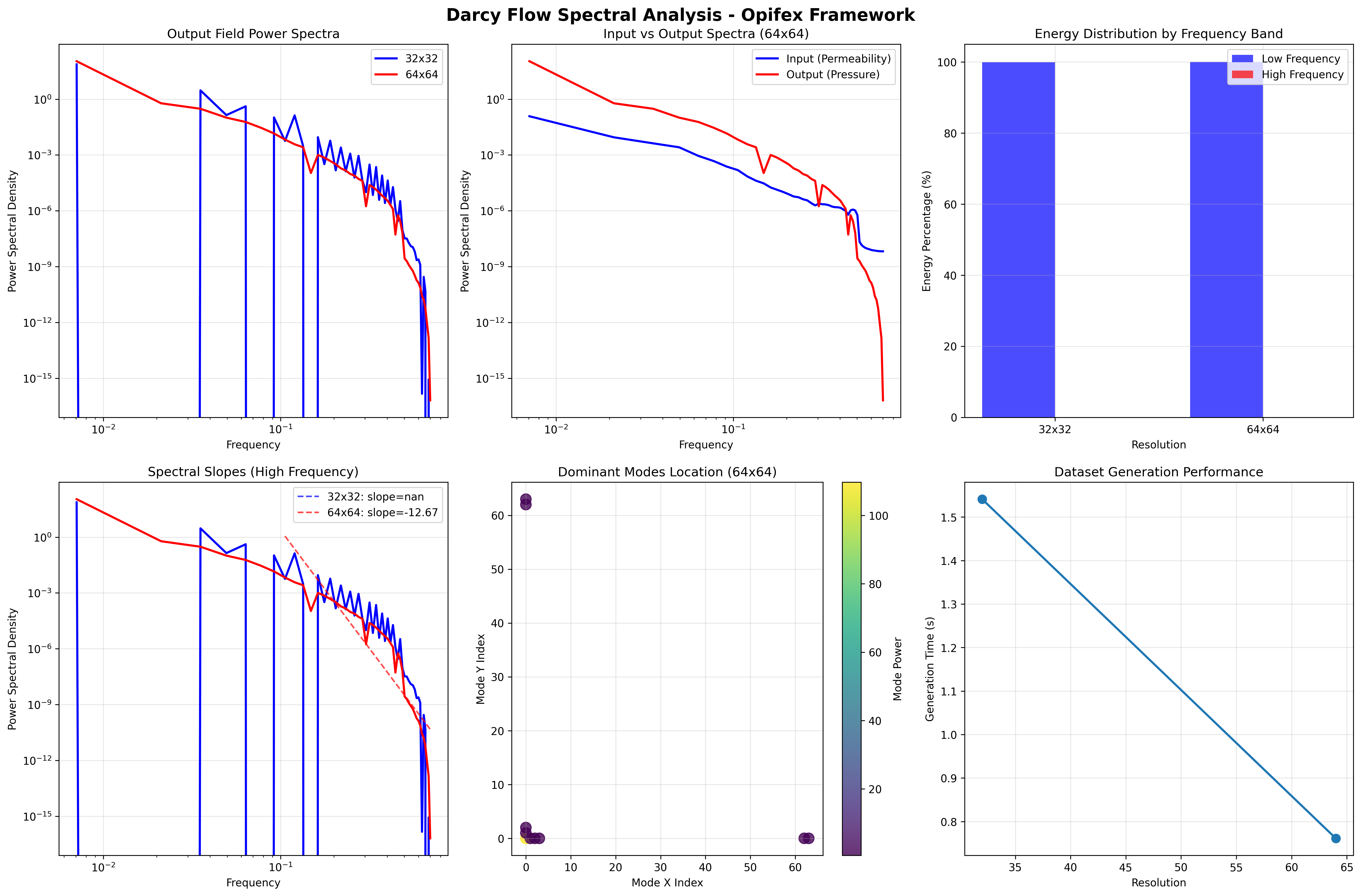
The analysis generates a full 6-panel spectral visualization:
Results Summary
| Metric | 32x32 | 64x64 | Interpretation |
|---|---|---|---|
| Low-freq Energy | 100.0% | 100.0% | Nearly all energy in low modes |
| High-freq Energy | 0.0% | 0.0% | Fine details contribute negligibly |
| Dominant Mode Count | 10 | 10 | Key spatial frequencies |
| Generation Time | 1.239s | 1.060s | Fast vmapped generation |
The energy split is reported with a cutoff_frequency=0.3 band: for these smooth
Darcy fields essentially all of the spectral energy lives below the cutoff, so the
low-frequency band rounds to 100.0% and the high-frequency band to 0.0%.
Key Takeaways
- Darcy flow fields are spectrally smooth — essentially all energy is in low-frequency modes
- This validates FNO's approach of truncating high-frequency modes
- Spectral properties are consistent across resolutions (resolution-independent physics)
- Spectral slopes (fit and plotted in the visualization) help select the optimal number of Fourier modes for FNO training
- Power-law behavior in the spectrum confirms self-similar structure of Darcy solutions
Next Steps
Experiments to Try
- Vary viscosity: Lower viscosity creates sharper features — observe spectral broadening
- Mode truncation study: Reconstruct fields with N modes and measure L2 error vs N
- Compare with FNO predictions: Run spectral analysis on FNO output to verify learned spectra
Related Examples
| Example | Level | What You'll Learn |
|---|---|---|
| Darcy Flow Analysis | Intermediate | Spatial domain statistics |
| FNO Darcy Full | Intermediate | Train FNO using spectral insights |
| Fourier Continuation | Intermediate | Handle non-periodic boundaries in spectral methods |
| Neural Operator Benchmark | Advanced | Cross-architecture comparison |
API Reference
generate_darcy- vmapped Darcy flow data generatorFourierNeuralOperator- FNO model that operates in Fourier spaceFourierSpectralConvolution- Spectral convolution layer
Troubleshooting
Spectral slope fitting fails
Symptom: jnp.linalg.lstsq returns NaN or very noisy slopes.
Cause: Not enough high-frequency data points, or spectrum has zeros.
Solution: Ensure the mask k_centers > 0.1 captures at least 5 points.
For very low-resolution data (16x16), lower the threshold:
Energy distribution sums to > 100%
Symptom: Low + high frequency percentages exceed 100%.
Cause: Floating point precision in frequency bin boundaries.
Solution: This is a cosmetic issue. The total energy is computed correctly; percentages may have minor rounding differences at the cutoff boundary.
Radial averaging produces jagged spectra
Symptom: Radially averaged spectrum has spikes instead of smooth decay.
Cause: Too few bins relative to the frequency resolution.
Solution: Increase n_bins in radial_average_spectrum: