GNO on Darcy Flow
| Metadata | Value |
|---|---|
| Level | Intermediate |
| Runtime | ~5 min (CPU) / ~30s (GPU) |
| Prerequisites | JAX, Flax NNX, GNN basics |
| Format | Python + Jupyter |
| Memory | ~1 GB RAM |
Overview
This tutorial demonstrates training a Graph Neural Operator (GNO) on the Darcy flow problem. GNO uses message passing neural networks to learn operators on graph-structured data, making it naturally suited for problems with irregular geometries or unstructured meshes.
Unlike Fourier-based operators (FNO, TFNO) that require uniform grids, GNO operates on arbitrary node connectivity patterns. This flexibility comes at the cost of computational efficiency on regular grids, where spectral methods excel. This example shows how to convert regular grid data to graph format and train a GNO.
GNO samples local neighborhoods rather than global spectral modes, which makes it genuinely harder to train on a regular Darcy grid than FNO or UNO. To make it converge we apply the standard operator-learning recipe: ~1000 training samples, Gaussian normalization of the input/output fields, the scale-invariant relative-L2 loss, and mini-batched optimization. The raw Darcy pressure has a small magnitude, so without normalization the loss gradients are negligible and the model collapses toward predicting a constant (relative-L2 error above 1).
What You'll Learn
- Convert 2D grid data to graph representation using
grid_to_graph_data() - Understand GNO's message passing architecture for operator learning
- Configure graph connectivity (4-neighbor, 8-neighbor, radius-based)
- Apply Gaussian normalization and the relative-L2 loss to make GNO converge
- Train a
GraphNeuralOperatorwith mini-batched optimization on node features - Visualize predictions by converting graph output back to grid format
Coming from NeuralOperator (PyTorch)?
If you are familiar with the neuraloperator library:
| NeuralOperator (PyTorch) | Opifex (JAX) |
|---|---|
GNOBlock(radius=0.035) |
GraphNeuralOperator(node_dim, hidden_dim, ...) |
| Runtime neighbor search (Open3D) | Pre-computed edge indices |
NeighborSearch module |
grid_to_graph_data(connectivity=8) |
IntegralTransform with MLP kernel |
MessagePassingLayer with explicit edge features |
| Handles variable node counts | Fixed graph structure (batch-friendly) |
Key differences:
- Pre-computed edges: Opifex expects edge indices upfront, enabling JAX's static shapes
- Explicit edge features: Edge features are computed externally and passed to the model
- Fixed batch structure: All graphs in a batch must have the same node/edge counts
- Grid-to-graph utilities: Built-in
grid_to_graph_data()for regular grid conversion
Files
- Python Script:
examples/neural-operators/gno_darcy.py - Jupyter Notebook:
examples/neural-operators/gno_darcy.ipynb
Quick Start
Run the Python Script
Run the Jupyter Notebook
Core Concepts
GNO Architecture
GNO applies message passing neural networks to learn operators on graphs:
graph LR
    subgraph Input
        A["Grid Data<br/>(1, 16, 16)"]
    end

    subgraph Preprocessing["Grid-to-Graph Conversion"]
        B["Flatten to Nodes<br/>(256 nodes)"]
        C["Create Edges<br/>(1860 edges)"]
        D["Compute Edge Features<br/>(relative positions)"]
    end

    subgraph GNO["Graph Neural Operator"]
        E["Input Projection<br/>node_dim → hidden_dim"]
        F["MessagePassingLayer 1"]
        G["MessagePassingLayer 2"]
        H["MessagePassingLayer 3"]
        I["MessagePassingLayer 4"]
        J["Output Projection<br/>hidden_dim → node_dim"]
    end

    subgraph Output
        K["Predicted Nodes<br/>(256 nodes)"]
        L["Reshape to Grid<br/>(1, 16, 16)"]
    end

    A --> B --> C --> D --> E --> F --> G --> H --> I --> J --> K --> L
Message Passing Layer
Each layer computes node updates through three steps:
graph TB
    A["Node Features<br/>(num_nodes, hidden_dim)"] --> B["Get Source Nodes<br/>src_nodes = nodes[edges[:, 0]]"]
    A --> C["Get Target Nodes<br/>dst_nodes = nodes[edges[:, 1]]"]
    D["Edge Features<br/>(num_edges, 2)"] --> E["Concatenate<br/>[src, dst, edge_feat]"]
    B --> E
    C --> E
    E --> F["Message MLP<br/>→ messages"]
    F --> G["Aggregate at Targets<br/>aggregated[dst] += messages"]
    G --> H["Update MLP<br/>[node, aggregated] → updated"]
    A --> H
    H --> I["Residual Connection<br/>+ original"]
    I --> J["Output<br/>(num_nodes, hidden_dim)"]

    style F fill:#e3f2fd,stroke:#1976d2
    style H fill:#fff3e0,stroke:#f57c00
When to Use GNO
| Problem Type | GNO | FNO | Recommendation |
|---|---|---|---|
| Regular 2D/3D grids | OK | Best | Use FNO for efficiency |
| Irregular meshes | Best | N/A | GNO handles any connectivity |
| Point clouds | Best | N/A | GNO works on unstructured data |
| Variable geometry | Best | Limited | GNO adapts to node layout |
| Large regular grids | Slow | Fast | FNO scales better (O(N log N)) |
Implementation
Step 1: Imports and Setup
import jax
from flax import nnx

from opifex.data.loaders import create_darcy_loader
from opifex.neural.operators.graph import (
    GraphNeuralOperator,
    graph_to_grid,
    grid_to_graph_data,
)
Terminal Output:
======================================================================
Opifex Example: GNO on Darcy Flow
======================================================================
JAX backend: gpu
JAX devices: [CudaDevice(id=0)]
Resolution: 16x16
Training samples: 1000, Test samples: 100
GNO config: hidden_dim=64, layers=4
Graph connectivity: 8-neighbor
Step 2: Data Loading and Graph Conversion
n_samples = 1000 + 100
loaders = create_darcy_loader(
    n_samples=n_samples,
    batch_size=32,
    resolution=16,
    val_fraction=100 / n_samples,
    seed=42,
)

# Drain every batch from each split into NCHW arrays.
X_train_np, Y_train_np = collect_split(loaders.train)
X_test_np, Y_test_np = collect_split(loaders.val)

# Fit Gaussian statistics on the training split, normalize all splits.
x_mean, x_std = X_train_np.mean(), X_train_np.std()
y_mean, y_std = Y_train_np.mean(), Y_train_np.std()
X_train_n = (X_train_np - x_mean) / x_std
Y_train_n = (Y_train_np - y_mean) / y_std

# Convert the normalized grids to graph format.
train_nodes, train_edges, train_edge_feats = grid_to_graph_data(
    jnp.array(X_train_n), connectivity=8
)
train_targets, _, _ = grid_to_graph_data(jnp.array(Y_train_n), connectivity=8)
Terminal Output:
Generating Darcy flow data...
Grid data: X=(1024, 1, 16, 16), Y=(1024, 1, 16, 16)
Input mean/std:  0.1825 / 0.1384
Output mean/std: 0.192145 / 0.156734

Converting grids to graphs...
Node features shape: (1024, 256, 3)
Edge indices shape:  (1024, 1860, 2)
Edge features shape: (1024, 1860, 2)
Num nodes per graph: 256 (16x16)
Num edges per graph: 1860
Step 3: Model Creation
gno = GraphNeuralOperator(
    node_dim=train_nodes.shape[-1],  # 3: value + x + y
    hidden_dim=64,
    num_layers=4,
    edge_dim=train_edge_feats.shape[-1],  # 2: dx, dy
    rngs=nnx.Rngs(42),
)
Terminal Output:
Step 4: Training
opt = nnx.Optimizer(gno, optax.adam(1e-3), wrt=nnx.Param)

def relative_l2_loss(pred_values, target_values):
    # Scale-invariant per-sample ||pred - y|| / ||y||, averaged over the batch.
    diff = jnp.linalg.norm(pred_values - target_values, axis=1)
    denom = jnp.linalg.norm(target_values, axis=1) + 1e-8
    return jnp.mean(diff / denom)

@nnx.jit
def train_step(model, opt, nodes, edges, edge_feats, targets):
    def loss_fn(model):
        pred = model(nodes, edges, edge_feats)
        # Compare the value channel only (not the position encoding).
        return relative_l2_loss(pred[:, :, 0], targets[:, :, 0])

    loss, grads = nnx.value_and_grad(loss_fn)(model)
    opt.update(model, grads)
    return loss

# Mini-batch over the full (normalized) training set every epoch.
Terminal Output:
Training GNO...
  Epoch   1/150: loss=6.190335
  Epoch  10/150: loss=0.222464
  Epoch  20/150: loss=0.169386
  Epoch  30/150: loss=0.132922
  Epoch  40/150: loss=0.127297
  Epoch  50/150: loss=0.123379
  Epoch  60/150: loss=0.116710
  Epoch  70/150: loss=0.102355
  Epoch  80/150: loss=0.124145
  Epoch  90/150: loss=0.102509
  Epoch 100/150: loss=0.092786
  Epoch 110/150: loss=0.091702
  Epoch 120/150: loss=0.098324
  Epoch 130/150: loss=0.094405
  Epoch 140/150: loss=0.092193
  Epoch 150/150: loss=0.090054
Final GNO loss: 9.005379e-02
Step 5: Evaluation
Terminal Output:
Running evaluation...
GNO Results:
  Test MSE:         2.524304e-04
  Relative L2:      0.060991 (min=0.025296, max=0.153613)
Predictions are un-normalized back to physical pressure (pred * y_std + y_mean)
before the relative-L2 error is computed, so the reported error is in physical
space. The test forward pass is run in batches to bound memory use.
Visualization
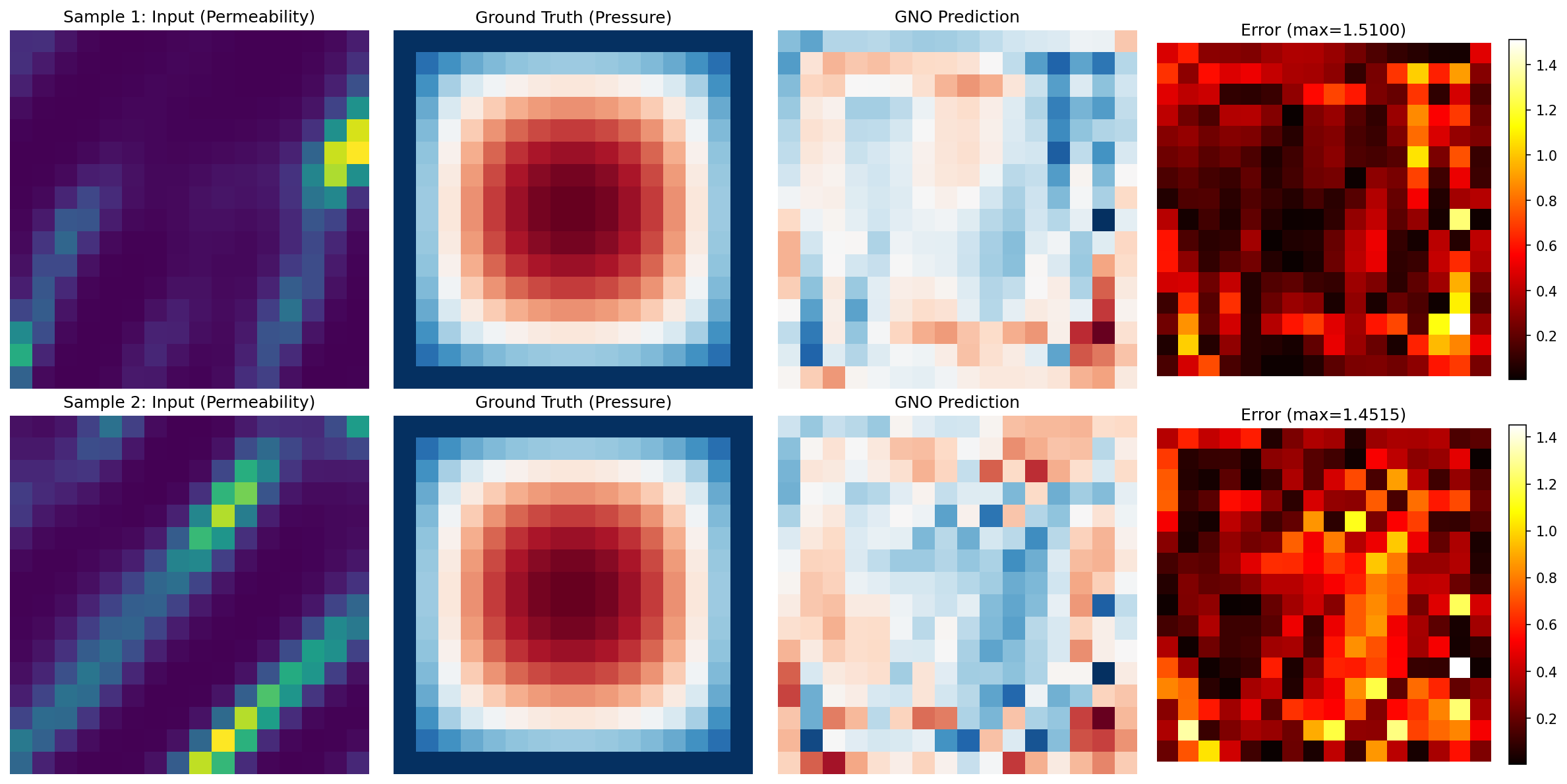
Predictions Comparison
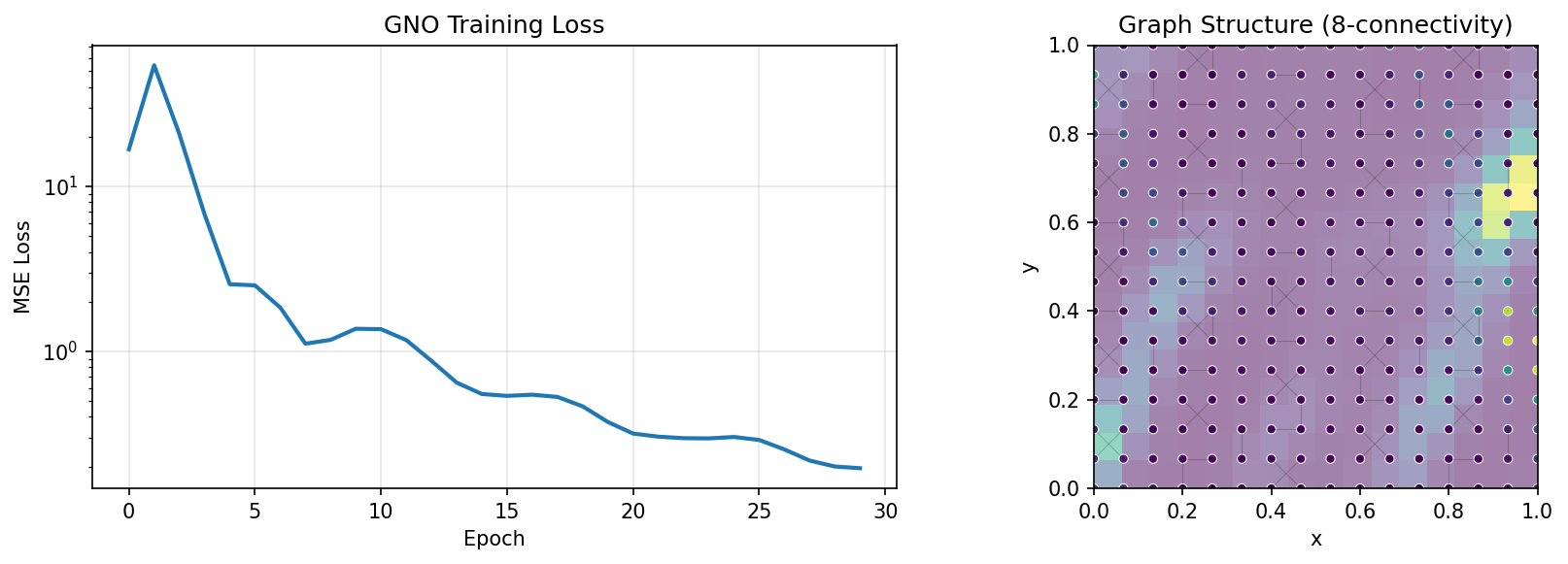
Training and Graph Structure
Results Summary
| Metric | GNO |
|---|---|
| Test MSE | 2.52e-04 |
| Relative L2 Error | 0.0610 |
| Parameters | 100,291 |
| Resolution | 16x16 |
Note: With the operator-learning recipe (Gaussian normalization + relative-L2 loss + ~1000 samples + 150 epochs), GNO reaches a ~6.1% relative-L2 error on Darcy flow — comfortably below the 10% target for graph operators on a regular grid. Without normalization the same model collapses to a constant prediction (relative-L2 error above 1), because the raw Darcy pressure scale starves the gradients. GNO remains slightly less accurate than spectral operators (FNO, UNO) on uniform grids, where Fourier convolutions are optimal, but it excels on problems with non-uniform meshes, complex boundaries, or varying node densities where FNO cannot be applied.
Next Steps
Experiments to Try
- Increase resolution: Try 32x32 (requires more memory due to O(n^2) edges)
- Try radius-based connectivity: Use
connectivity="radius", radius=1.5 - Apply to irregular mesh: Load mesh data instead of regular grid
- Combine with FNO: Use GNO for boundary regions, FNO for interior (GINO approach)
Related Examples
| Example | Level | What You'll Learn |
|---|---|---|
| FNO on Darcy Flow | Intermediate | Spectral methods (compare MSE) |
| Local FNO on Darcy | Intermediate | Local + global features |
| DeepONet on Darcy | Intermediate | Branch-trunk architecture |
API Reference
GraphNeuralOperator- Graph neural operator modelMeshGraphNet- Encoder-processor-decoder architecture for mesh-based simulation (Pfaff et al., 2021). ReusesMessagePassingLayerinternallyMessagePassingLayer- Individual message passing layergrid_to_graph_data- Grid to graph conversion utilitygraph_to_grid- Graph to grid conversion utilitycreate_darcy_loader- Darcy flow data loader
Troubleshooting
Memory error with large grids
Symptom: RESOURCE_EXHAUSTED error when increasing resolution.
Cause: 8-connectivity creates O(8n) edges where n = H*W nodes. At 32x32 = 1024 nodes with ~7000 edges, memory usage grows significantly.
Solution: Reduce connectivity or batch size:
# Use 4-connectivity (fewer edges)
node_features, edge_indices, edge_features = grid_to_graph_data(
    grid, connectivity=4
)

# Or reduce batch size
BATCH_SIZE = 8
Relative L2 error stays above 1 (model not learning)
Symptom: Training MSE drops, but the test relative-L2 error is greater than 1 (worse than predicting the mean).
Cause: Missing normalization and/or a raw-MSE loss. The Darcy pressure field has a small magnitude, so unnormalized MSE gradients are negligible and the model collapses toward a constant. Draining only the first batch instead of the full training split has the same effect.
Solution: Fit Gaussian statistics on the training split, normalize the input
and output fields, train with the scale-invariant relative_l2 loss, and
un-normalize predictions before scoring. Drain every batch from loaders.train
and loaders.val via collect_split.
GNO is less accurate than FNO on regular grids
Symptom: Slightly higher relative-L2 than FNO/UNO on the same grid.
Cause: This is expected. GNO learns from local neighborhoods; FNO/UNO spectral convolutions are optimal on uniform grids.
Solution: Prefer FNO/UNO for regular grids. Reserve GNO for: - Unstructured meshes - Adaptive refinement regions - Complex boundary geometries - Point cloud data
JIT compilation is slow
Symptom: First forward pass takes a long time.
Cause: Message passing over many edges requires tracing.
Solution: The first call triggers XLA compilation. Subsequent calls are fast. For development, use smaller grids: