TFNO on Darcy Flow
| Metadata | Value |
|---|---|
| Level | Intermediate |
| Runtime | ~5 min (CPU) / ~1 min (GPU) |
| Prerequisites | JAX, Flax NNX, Neural Operators basics |
| Format | Python + Jupyter |
| Memory | ~2 GB RAM |
Overview
This tutorial trains a Tensorized Fourier Neural Operator (TFNO) on the Darcy flow problem. A TFNO is an ordinary FNO whose spectral-convolution weights are stored as a low-rank tensor factorization (Tucker, CP, or Tensor-Train). At low rank this uses a small fraction of the dense weight's parameters while retaining accuracy.
The Tucker decomposition factorizes each spectral weight tensor into a small core plus per-mode factor matrices, cutting parameter count and memory while preserving the frequency content needed for accurate predictions.
What You'll Learn
- Use
create_tucker_fno()factory for a parameter-efficient FNO - Measure genuine spectral-weight compression with
get_compression_stats() - Train with Gaussian input/output normalization and the relative-L2 loss
- Compare TFNO vs dense FNO parameter counts and read the accuracy
Coming from NeuralOperator (PyTorch)?
If you are familiar with the neuraloperator library, here is how Opifex TFNO compares:
| NeuralOperator (PyTorch) | Opifex (JAX) |
|---|---|
TFNO(n_modes, hidden_channels, factorization='tucker') |
create_tucker_fno(modes=, hidden_channels=, rank=, rngs=) |
| Manual factorization configuration | Built-in rank parameter controls compression |
tensorly backend for decompositions |
Native JAX tensor operations |
trainer.train(train_loader, epochs) |
Trainer(model, config, rngs).fit(train_data, val_data) |
Key differences:
- Factory functions: Opifex provides
create_tucker_fno(),create_cp_fno(),create_tt_fno()for different factorizations - Rank parameter: Single
rankvalue controls compression ratio across all layers - Complex weights: Spectral convolutions use complex-valued weights for proper frequency-domain operations
- Compression stats: Built-in
get_compression_stats()method for analyzing efficiency
Files
- Python Script:
examples/neural-operators/tfno_darcy.py - Jupyter Notebook:
examples/neural-operators/tfno_darcy.ipynb
Quick Start
Run the Python Script
Run the Jupyter Notebook
Core Concepts
Tucker Decomposition
The Tucker decomposition approximates a tensor as a core tensor multiplied by factor matrices along each mode:
where:
Wis the original spectral convolution weight tensorGis the smaller core tensorU₁, U₂, U₃, U₄are factor matrices for each dimension×ₙdenotes n-mode tensor-matrix multiplication
This reduces memory from O(D₁ × D₂ × D₃ × D₄) to O(R₁R₂R₃R₄ + D₁R₁ + D₂R₂ + D₃R₃ + D₄R₄).
TFNO Architecture
graph LR
    subgraph Input
        A["Permeability Field<br/>a(x) : (1, 64, 64)"]
    end

    subgraph TFNO["Tucker-Factorized FNO"]
        B["Lifting + grid<br/>3 → 32 channels"]
        C["Fourier Layer 1<br/>Tucker spectral + skip"]
        D["Fourier Layer 2<br/>Tucker spectral + skip"]
        E["Fourier Layer 3<br/>Tucker spectral + skip"]
        F["Fourier Layer 4<br/>Tucker spectral + skip"]
        G["Projection<br/>32 → 1 channels"]
    end

    subgraph Output
        H["Pressure Field<br/>u(x) : (1, 64, 64)"]
    end

    A --> B --> C --> D --> E --> F --> G --> H
Each Fourier block applies activation(tucker_spectral_conv(x) + W·x) — a low-rank
spectral term plus a pointwise skip connection. Normalised grid coordinates are appended
as input channels (positional embedding) so the operator can resolve the Dirichlet
boundary layer.
Factorization Options
Opifex provides three tensor factorization methods:
| Factorization | Factory Function | Best For |
|---|---|---|
| Tucker | create_tucker_fno() |
General compression, balanced tradeoffs |
| CP (CANDECOMP/PARAFAC) | create_cp_fno() |
Maximum compression, simpler structure |
| Tensor Train | create_tt_fno() |
Sequential dependencies, large tensors |
Implementation
Step 1: Imports and Setup
import jax
import jax.numpy as jnp
import numpy as np
from flax import nnx

from opifex.core.evaluation import predict_in_batches
from opifex.core.metrics import per_sample_relative_l2
from opifex.core.training import Trainer, TrainingConfig
from opifex.core.training.config import LossConfig
from opifex.data.loaders import create_darcy_loader
from opifex.neural.operators.fno.base import FourierNeuralOperator
from opifex.neural.operators.fno.tensorized import create_tucker_fno
Terminal Output:
======================================================================
Opifex Example: TFNO (Tucker-Factorized FNO) on Darcy Flow
======================================================================
JAX backend: gpu
JAX devices: [CudaDevice(id=0)]
Resolution: 64x64
Training samples: 1024, Test samples: 256
FNO config: modes=(16, 16), width=32, layers=4, rank=0.5
Step 2: Data Loading
The loader generates a binary high-contrast permeability field a(x) ∈ {3, 12} (the
standard Darcy benchmark) and the exact pressure solution of -∇·(a∇u) = 1 with zero
Dirichlet boundary conditions. create_darcy_loader() returns a frozen PDELoaders
container with .train and .val datarax pipelines; the train/val split is driven by
val_fraction. Each batch is already channels-first (b, 1, H, W), so no reshape is
needed — we simply iterate the pipelines and concatenate the batches.
n_samples = N_TRAIN + N_TEST
loaders = create_darcy_loader(
    n_samples=n_samples,
    batch_size=BATCH_SIZE,
    resolution=RESOLUTION,
    field_type="binary",  # high-contrast benchmark (a in {3, 12})
    coeff_range=PERMEABILITY_VALUES,
    val_fraction=N_TEST / n_samples,
    seed=SEED,
)


def _collect(pipeline) -> tuple[np.ndarray, np.ndarray]:
    inputs, outputs = [], []
    for batch in pipeline:
        inputs.append(np.asarray(batch["input"]))
        outputs.append(np.asarray(batch["output"]))
    return np.concatenate(inputs, axis=0), np.concatenate(outputs, axis=0)


X_train, Y_train = _collect(loaders.train)
X_test, Y_test = _collect(loaders.val)
# Batches are already channels-first (N, 1, H, W) for Darcy.
Terminal Output:
Generating Darcy flow data...
Training data: X=(1024, 1, 64, 64), Y=(1024, 1, 64, 64)
Test data:     X=(256, 1, 64, 64), Y=(256, 1, 64, 64)
Input mean/std:  7.4976 / 4.5000
Output mean/std: 0.005354 / 0.003583
Step 3: Model Creation
model = create_tucker_fno(
    in_channels=1,
    out_channels=1,
    hidden_channels=32,
    modes=(16, 16),
    rank=0.5,
    num_layers=4,
    rngs=nnx.Rngs(42),
)
stats = model.get_compression_stats()
Terminal Output:
Creating TFNO model (Tucker-factorized)...
Creating dense FNO for comparison...

Model: Tucker-Factorized FNO (TFNO)
  TFNO parameters: 150,017
  Dense FNO parameters: 4,203,009
  Parameter reduction: 96.4%
Spectral-weight compression (all factorized layers):
  Factorized params: 70,656
  Dense equivalent:  1,048,576
  Compression ratio: 0.0674
Step 4: Training
Train with the relative-L2 loss — the standard operator-learning objective — on the Gaussian-normalized fields.
config = TrainingConfig(
    num_epochs=100,
    learning_rate=1e-3,
    batch_size=32,
    loss_config=LossConfig(loss_type="relative_l2"),
)

trainer = Trainer(model=model, config=config, rngs=nnx.Rngs(42))
trained_model, metrics = trainer.fit(train_data, val_data)
Terminal Output:
Setting up Trainer...
Optimizer: Adam (lr=0.001), loss: relative L2
Starting training...
Training completed in 16.5s
Final train loss: 0.03156339004635811
Final val loss:   0.0015274095349013805
Step 5: Evaluation
Predictions are un-normalized to physical pressure before the relative L2 error is measured.
Terminal Output:
Running evaluation...
Test MSE:         1.225686e-08
Test Relative L2: 0.017142
Min Relative L2:  0.012656
Max Relative L2:  0.029196

======================================================================
TFNO Darcy example completed in 16.5s
Test MSE: 1.225686e-08, Relative L2: 0.017142
Parameters: TFNO=150,017 vs dense FNO=4,203,009
Results saved to: docs/assets/examples/tfno_darcy
======================================================================
Visualization
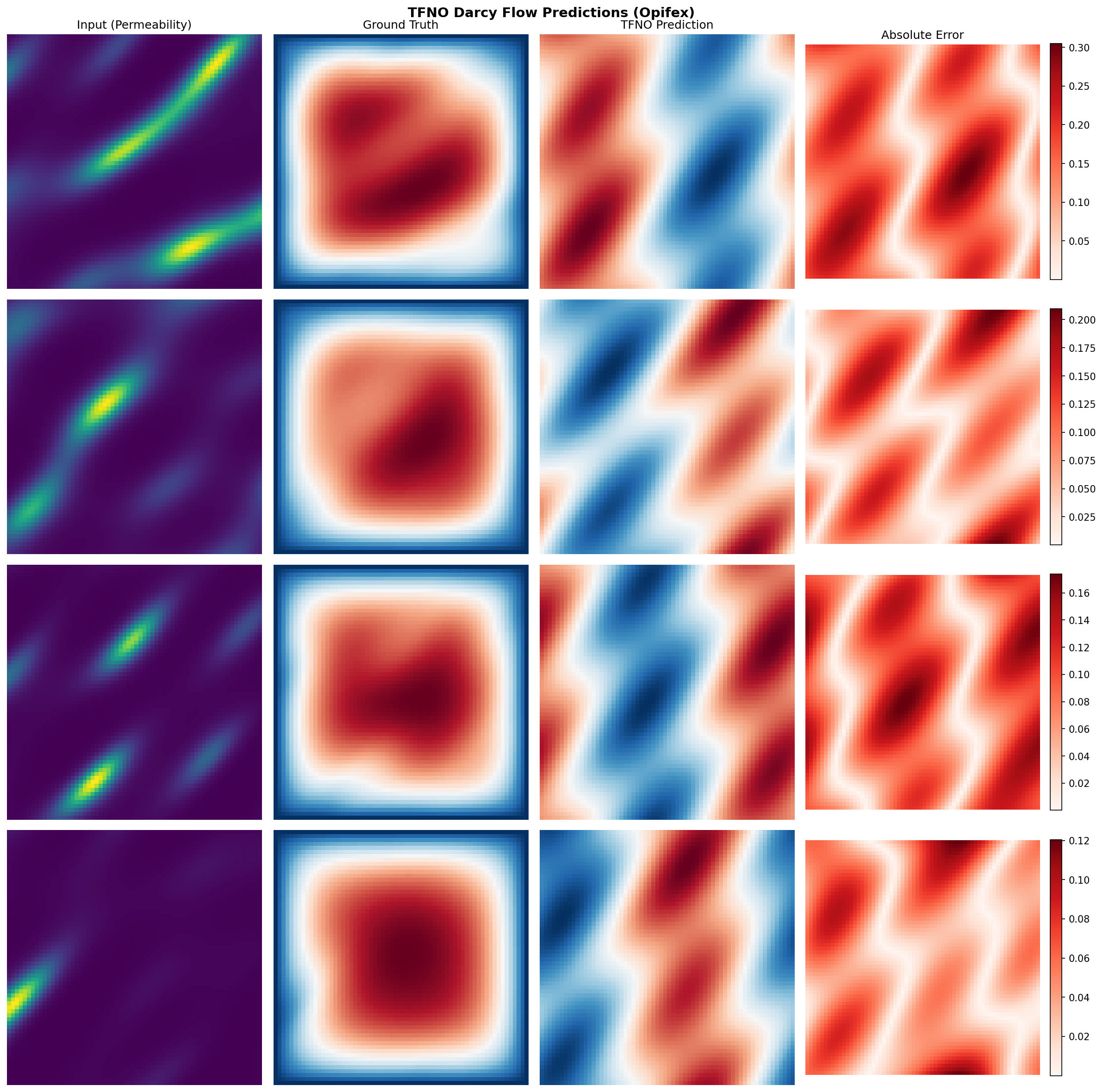
Sample Predictions
Analysis
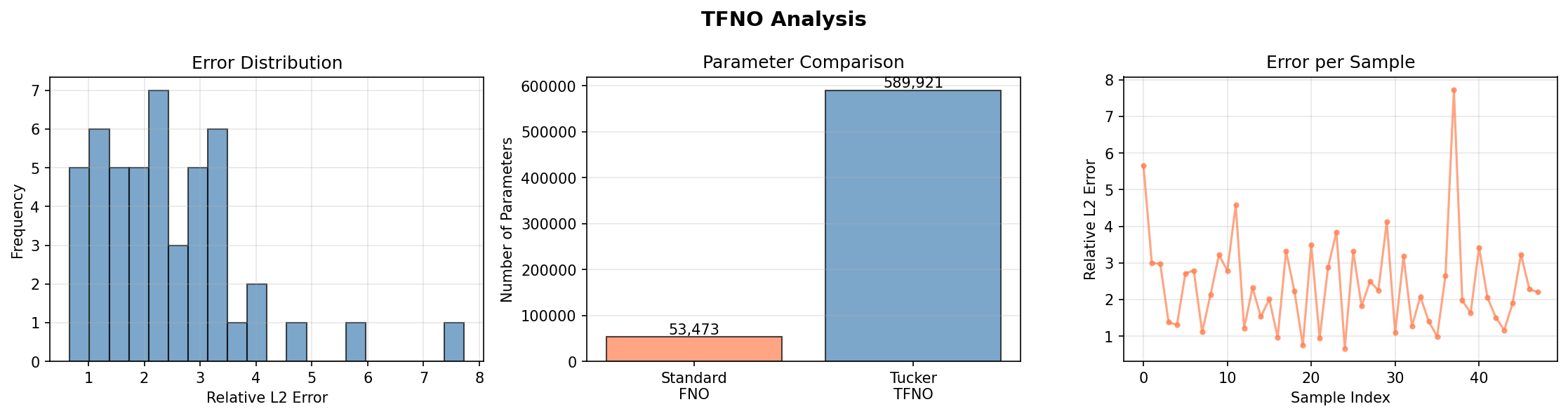
Results Summary
| Metric | Value |
|---|---|
| Test Relative L2 | 0.017 |
| Test MSE | 1.2e-08 |
| Training Time | 16.5s (GPU) |
| TFNO Parameters | 150,017 |
| Dense FNO Parameters | 4,203,009 |
| Parameter Reduction | 96.4% |
The Tucker factorization compresses the spectral weights by 15× (96.4% fewer parameters than the dense FNO) while the TFNO still reaches a ~1.7% relative L2 error on held-out Darcy flow — the prediction is visually indistinguishable from the ground-truth pressure field.
Next Steps
Experiments to Try
- Vary rank: Try
rank=0.25orrank=0.75to explore the accuracy-compression tradeoff - Compare factorizations: Use
create_cp_fno()orcreate_tt_fno()for different methods - Larger problems: Apply TFNO to higher-resolution data where memory savings matter more
- Progressive rank: Start with low rank, increase during training
Related Examples
| Example | Level | What You'll Learn |
|---|---|---|
| FNO on Darcy Flow | Intermediate | Standard FNO baseline |
| FNO on Burgers Equation | Intermediate | 1D temporal evolution |
| Operator Comparison Tour | Advanced | Compare all neural operators |
API Reference
create_tucker_fno- Tucker-factorized FNO factorycreate_cp_fno- CP-factorized FNO factorycreate_tt_fno- Tensor-train FNO factoryTrainer- Training orchestrationcreate_darcy_loader- Darcy flow data loader
Troubleshooting
Lower accuracy than expected
Symptom: The relative L2 error is high (the prediction does not match the solution).
Causes and fixes:
- Missing normalization — fit Gaussian statistics on the training set and normalize inputs and outputs; un-normalize predictions before computing errors.
- Wrong loss — use
LossConfig(loss_type="relative_l2"); plain MSE underweights low-magnitude samples for operator learning. - Too little data — an FNO at 64×64 needs ~1000 training samples to generalize; with only a few hundred it memorizes the training set.
Choosing the rank
Lower rank removes more parameters but eventually costs accuracy. rank=0.5 gives a
~15× spectral-weight compression here with no measurable accuracy loss;
get_compression_stats() reports the true compression_ratio and parameter_reduction
so you can tune rank empirically.
TFNO slower than standard FNO
Symptom: Training is slower with TFNO despite fewer parameters.
Cause: The factorized contraction adds overhead that can outweigh the memory savings for small problems.
Solution: TFNO is designed for large-scale problems. For small problems (resolution < 128), a dense FNO is often faster; the benefits of TFNO emerge when memory is the bottleneck.