FNO on Darcy Flow
| Metadata | Value |
|---|---|
| Level | Intermediate |
| Runtime | ~3 min (CPU) / ~1 min (GPU) |
| Prerequisites | JAX, Flax NNX, Neural Operators basics |
| Format | Python + Jupyter |
| Memory | ~2 GB RAM |
Overview
This tutorial demonstrates training a Fourier Neural Operator (FNO) on the Darcy flow problem, a standard benchmark in neural operator research. The Darcy flow equation models steady-state fluid flow through porous media, mapping a permeability coefficient field to a pressure solution field.
What makes this example stand out is the composition of GridEmbedding2D with
FourierNeuralOperator. Grid embeddings inject spatial coordinate information as additional
input channels, giving the FNO positional awareness that improves operator learning for
spatially varying problems. The example uses Opifex's own Darcy data via
create_darcy_loader (smooth Darcy, solved with the accurate direct solver) and the
standard operator-learning recipe: Gaussian normalization, the relative-L2 loss,
AdamW with weight decay, and an exponential learning-rate schedule. It covers the full
pipeline: loading the data, model creation, training with the unified Trainer API,
evaluation with L2 relative error, and full visualization of predictions and error
distributions.
This is the FNO counterpart to UNO on Darcy Flow and Your First Neural Operator, which use the same synthetic Darcy data and recipe.
What You'll Learn
- Compose
GridEmbedding2DwithFourierNeuralOperatorfor positional encoding - Load Darcy flow data with
create_darcy_loader(datarax pipelines) - Apply Gaussian normalization and the relative-L2 loss via
LossConfig - Use
AdamW, weight decay, and an exponential learning-rate schedule - Evaluate with L2 relative error and a train-vs-test overfitting check
- Visualize predictions, ground truth comparisons, and error distributions
Coming from NeuralOperator (PyTorch)?
If you are familiar with the neuraloperator library, here is how Opifex compares for this workflow:
| NeuralOperator (PyTorch) | Opifex (JAX) |
|---|---|
FNO(n_modes, hidden_channels) |
FourierNeuralOperator(modes=, hidden_channels=, num_layers=, rngs=) |
Manual torch.meshgrid for positional encoding |
GridEmbedding2D(in_channels=, grid_boundaries=) |
| Custom Darcy dataset / loader | create_darcy_loader(n_samples=, resolution=, ...) |
LpLoss(d=2, p=2) (relative) |
LossConfig(loss_type="relative_l2") |
trainer.train(train_loader, epochs) |
Trainer(model, config, rngs).fit(train_data, val_data) |
AdamW(lr, weight_decay) + LR schedule |
OptimizationConfig(optimizer="adamw", weight_decay=, schedule_type=...) |
Manual training loop with loss.backward() |
Automatic JIT-compiled training loop via Trainer.fit() |
Key differences:
- Explicit PRNG: Opifex uses JAX's explicit
rngs=nnx.Rngs(42)instead of global random state - Composable grid embedding:
GridEmbedding2Dcomposes cleanly withFourierNeuralOperatorvia standardnnx.Modulesubclassing - XLA compilation: Automatic JIT compilation in
Trainer.fit()for faster training - Functional transforms:
jax.grad,jax.vmap,jax.pmapfor composable differentiation and parallelism
Files
- Python Script:
examples/neural-operators/fno_darcy.py - Jupyter Notebook:
examples/neural-operators/fno_darcy.ipynb
Quick Start
Run the Python Script
Run the Jupyter Notebook
Core Concepts
The Fourier Neural Operator
The FNO learns operator mappings between function spaces by parameterizing convolution kernels in Fourier space. Each spectral layer performs four operations:
- FFT: Transform input to the frequency domain
- Spectral convolution: Apply learned linear transform to truncated Fourier modes
- Inverse FFT: Transform back to the spatial domain
- Skip connection: Add a local linear transform (pointwise convolution)
This spectral approach gives each layer a global receptive field, enabling the FNO to capture long-range spatial correlations in a single pass.
FNO Architecture with Grid Embedding
In this example, we compose GridEmbedding2D with FourierNeuralOperator to inject
spatial coordinate information before the spectral layers process the data. The grid
embedding appends x and y coordinate channels to the input, expanding a 1-channel
permeability field into a 3-channel tensor (permeability + x-coord + y-coord).
graph LR
    subgraph Input
        A["Permeability Field<br/>a(x) : R^(1x32x32)"]
    end

    subgraph Embedding["Grid Embedding"]
        B["GridEmbedding2D<br/>Append (x, y) coords<br/>1 ch -> 3 ch"]
    end

    subgraph FNO["Fourier Neural Operator"]
        C["Lifting Layer<br/>P: R^3 -> R^32"]
        D["Spectral Layer 1<br/>FFT -> Conv -> IFFT + Skip"]
        E["Spectral Layer 2<br/>FFT -> Conv -> IFFT + Skip"]
        F["Spectral Layer 3<br/>FFT -> Conv -> IFFT + Skip"]
        G["Spectral Layer 4<br/>FFT -> Conv -> IFFT + Skip"]
        H["Projection Layer<br/>Q: R^32 -> R^1"]
    end

    subgraph Output
        I["Pressure Field<br/>u(x) : R^(1x32x32)"]
    end

    A --> B --> C --> D --> E --> F --> G --> H --> I

    style A fill:#e3f2fd,stroke:#1976d2
    style B fill:#fff3e0,stroke:#f57c00
    style I fill:#c8e6c9,stroke:#388e3c
Darcy Flow Problem
The Darcy flow equation models steady-state fluid flow through porous media:
| Variable | Meaning | Role |
|---|---|---|
| \(a(x)\) | Permeability field | Input function (what we observe) |
| \(u(x)\) | Pressure field | Output function (what we predict) |
| \(f(x)\) | Forcing term | Fixed (constant source) |
| \(D\) | Domain | Unit square \([0, 1]^2\) |
The neural operator learns the mapping \(a(x) \mapsto u(x)\) from data, without needing to solve the PDE at inference time.
Implementation
Step 1: Imports and Setup
import time
import warnings
from pathlib import Path

warnings.filterwarnings("ignore")

import jax
import jax.numpy as jnp
import matplotlib as mpl
import numpy as np
from flax import nnx

mpl.use("Agg")
import matplotlib.pyplot as plt

# Opifex framework imports
from opifex.core.training import Trainer, TrainingConfig
from opifex.core.training.config import LossConfig, OptimizationConfig
from opifex.data.loaders import create_darcy_loader
from opifex.neural.operators.common.embeddings import GridEmbedding2D
from opifex.neural.operators.fno.base import FourierNeuralOperator
Terminal Output:
======================================================================
Opifex Example: FNO on Darcy Flow
======================================================================
JAX backend: gpu
JAX devices: [CudaDevice(id=0)]
Step 2: Configuration
Define the hyperparameters for data generation, model architecture, and training:
RESOLUTION = 32  # synthetic Darcy resolution
N_TRAIN = 1000
N_TEST = 100
BATCH_SIZE = 32
NUM_EPOCHS = 200
LEARNING_RATE = 5e-3  # AdamW initial LR
WEIGHT_DECAY = 1e-4  # regularization to combat overfitting
MODES = 12
HIDDEN_WIDTH = 32
NUM_LAYERS = 4
DOMAIN_PADDING = 0.25  # fraction of each spatial dim (resolution-invariant Gibbs padding)
SEED = 42

OUTPUT_DIR = Path("docs/assets/examples/fno_darcy")
OUTPUT_DIR.mkdir(parents=True, exist_ok=True)
Terminal Output:
Resolution: 32x32
Training samples: 1000, Test samples: 100
Batch size: 32, Epochs: 200
FNO config: modes=12, width=32, layers=4
Optimizer: AdamW (lr=0.005, weight_decay=0.0001)
LR schedule: exponential, x0.5 every 60 epochs
| Hyperparameter | Value | Purpose |
|---|---|---|
RESOLUTION |
32 | Spatial grid resolution (32x32) |
N_TRAIN / N_TEST |
1000 / 100 | Train / test split from create_darcy_loader |
BATCH_SIZE |
32 | Samples per training batch |
NUM_EPOCHS |
200 | Training iterations over full dataset |
LEARNING_RATE |
5e-3 | AdamW initial learning rate |
WEIGHT_DECAY |
1e-4 | L2 weight decay (regularization) |
MODES |
12 | Number of Fourier modes retained per dimension |
HIDDEN_WIDTH |
32 | Width of the spectral layers |
DOMAIN_PADDING |
0.25 | Spatial padding fraction (resolution-invariant) to reduce the Gibbs phenomenon |
Step 3: Data Loading
We generate Darcy flow data with create_darcy_loader (smooth Darcy, solved with the
accurate direct solver) and serve it via datarax pipelines. create_darcy_loader returns
a frozen PDELoaders with .train / .val datarax pipelines, split by val_fraction.
The batches are already channels-first {"input": (b, 1, H, W), "output": (b, 1, H, W)},
so we just drain each pipeline into arrays for Trainer.fit().
loaders = create_darcy_loader(
    n_samples=n_samples,
    batch_size=batch_size,
    resolution=resolution,
    val_fraction=n_test / n_samples,
    seed=seed,
)

# Collect the datarax pipelines into arrays for Trainer.fit(). Batches are
# channels-first {"input": (b, 1, H, W), "output": (b, 1, H, W)}.
def _collect(pipeline) -> tuple[np.ndarray, np.ndarray]:
    inputs, outputs = [], []
    for batch in pipeline:
        inputs.append(np.asarray(batch["input"]))
        outputs.append(np.asarray(batch["output"]))
    return np.concatenate(inputs, axis=0), np.concatenate(outputs, axis=0)

x_train, y_train = _collect(loaders.train)
x_test, y_test = _collect(loaders.val)
Terminal Output:
Generating Darcy flow data (jit+vmap) and serving via datarax...
Training data: X=(1024, 1, 32, 32), Y=(1024, 1, 32, 32)
Test data:     X=(128, 1, 32, 32), Y=(128, 1, 32, 32)
We fit Gaussian statistics on the training set, normalize all splits, and un-normalize predictions before measuring the physical-space relative L2 error:
x_mean, x_std = x_train.mean(), x_train.std()
y_mean, y_std = y_train.mean(), y_train.std()

x_train_n = (x_train - x_mean) / x_std
y_train_n = (y_train - y_mean) / y_std
Terminal Output:
Step 4: Model Creation -- Composing GridEmbedding2D with FNO
The key architectural pattern in this example is composing GridEmbedding2D with
FourierNeuralOperator inside a single nnx.Module. The grid embedding appends
spatial coordinates as additional channels, providing the FNO with positional awareness.
class FNOWithEmbedding(nnx.Module):
    """FNO model with built-in grid embedding for positional encoding."""

    def __init__(
        self,
        in_channels: int,
        out_channels: int,
        modes: int,
        hidden_channels: int,
        num_layers: int,
        grid_boundaries: list[list[float]],
        *,
        domain_padding: float,
        rngs: nnx.Rngs,
    ) -> None:
        super().__init__()
        self.grid_embedding = GridEmbedding2D(
            in_channels=in_channels,
            grid_boundaries=grid_boundaries,
        )
        self.fno = FourierNeuralOperator(
            in_channels=self.grid_embedding.out_channels,
            out_channels=out_channels,
            hidden_channels=hidden_channels,
            modes=modes,
            num_layers=num_layers,
            domain_padding=domain_padding,
            rngs=rngs,
        )

    def __call__(self, x: jax.Array) -> jax.Array:
        """Forward pass: grid embedding -> FNO."""
        # Convert (batch, channels, H, W) -> (batch, H, W, channels) for embedding
        x_hwc = jnp.moveaxis(x, 1, -1)
        x_embedded = self.grid_embedding(x_hwc)
        # Convert back to (batch, channels, H, W) for FNO
        x_chw = jnp.moveaxis(x_embedded, -1, 1)
        return self.fno(x_chw)
Create the model instance:
model = FNOWithEmbedding(
    in_channels=1,
    out_channels=1,
    modes=MODES,
    hidden_channels=HIDDEN_WIDTH,
    num_layers=NUM_LAYERS,
    grid_boundaries=[[0.0, 1.0], [0.0, 1.0]],
    domain_padding=DOMAIN_PADDING,
    rngs=nnx.Rngs(SEED),
)
Terminal Output:
Creating FNO model with grid embedding...
Model: FNO + GridEmbedding2D
  Input channels: 1 (+ 2 grid coords = 3 after embedding)
  Fourier modes: 12, Hidden width: 32, Layers: 4
  Total parameters: 2,368,001
Why Grid Embeddings?
GridEmbedding2D appends normalized x and y coordinates to each spatial
location, expanding the input from 1 channel to 3 channels. This positional
encoding helps the FNO learn spatially varying operators where the solution
depends on position within the domain, not just the local input value.
Step 5: The Relative-L2 Loss and Training
We train with the relative-L2 loss, the standard operator-learning objective. It normalizes each sample's L2 error by the L2 norm of the target, so every example contributes proportionally regardless of its magnitude:
The loss is selected declaratively via LossConfig — no Trainer subclass is needed.
Training uses AdamW, weight decay, and an exponential learning-rate schedule (halve
every 60 epochs), all via OptimizationConfig:
config = TrainingConfig(
    num_epochs=NUM_EPOCHS,
    batch_size=BATCH_SIZE,
    validation_frequency=20,
    verbose=True,
    loss_config=LossConfig(loss_type="relative_l2"),
    optimization_config=OptimizationConfig(
        optimizer="adamw",
        learning_rate=LEARNING_RATE,
        weight_decay=WEIGHT_DECAY,
        schedule_type="exponential",
        transition_steps=LR_TRANSITION_STEPS,
        decay_rate=LR_DECAY_RATE,
    ),
)

trainer = Trainer(model=model, config=config, rngs=nnx.Rngs(SEED))

trained_model, metrics = trainer.fit(
    train_data=(jnp.array(X_train_n), jnp.array(Y_train_n)),
    val_data=(jnp.array(X_test_n), jnp.array(Y_test_n)),
)
Terminal Output:
Setting up Trainer...
Optimizer: AdamW (lr=0.005, weight_decay=0.0001)
Loss: relative L2 (the standard operator-learning objective)

Starting training...
Training completed in 18.4s
Final train loss: 0.006624664645642042
Final val loss:   0.0001833601709222421
Step 6: Full Evaluation
Predictions are un-normalized back to physical pressure units before measuring the error. We run both the test and training sets through the model in batches (to bound memory) and compare their relative L2 errors to expose any overfitting:
# Un-normalize predictions back to physical pressure units
predictions = predict_in_batches(trained_model, x_test_jnp) * y_std + y_mean
train_predictions = predict_in_batches(trained_model, x_train_jnp) * y_std + y_mean

# Test relative L2 (per sample) in physical units
test_mse = float(jnp.mean((predictions - y_test_jnp) ** 2))
per_sample_rel_l2 = per_sample_relative_l2(predictions, y_test_jnp)
mean_rel_l2 = float(jnp.mean(per_sample_rel_l2))
train_rel_l2 = float(relative_l2_error(train_predictions, y_train_jnp))
Terminal Output:
Running evaluation...
Train Relative L2: 0.004973
Test  Relative L2: 0.007588
Overfitting gap (test - train): +0.002615
Test MSE:         4.024144e-06
Min Relative L2:  0.004003
Max Relative L2:  0.021948
Reading the Relative L2 Error
Errors are measured in physical pressure units after un-normalizing the predictions. A test relative L2 of ~0.76% with a sub-0.3% train-vs-test gap confirms the FNO learns the Darcy operator accurately and generalizes well on this data.
Step 7: Visualization
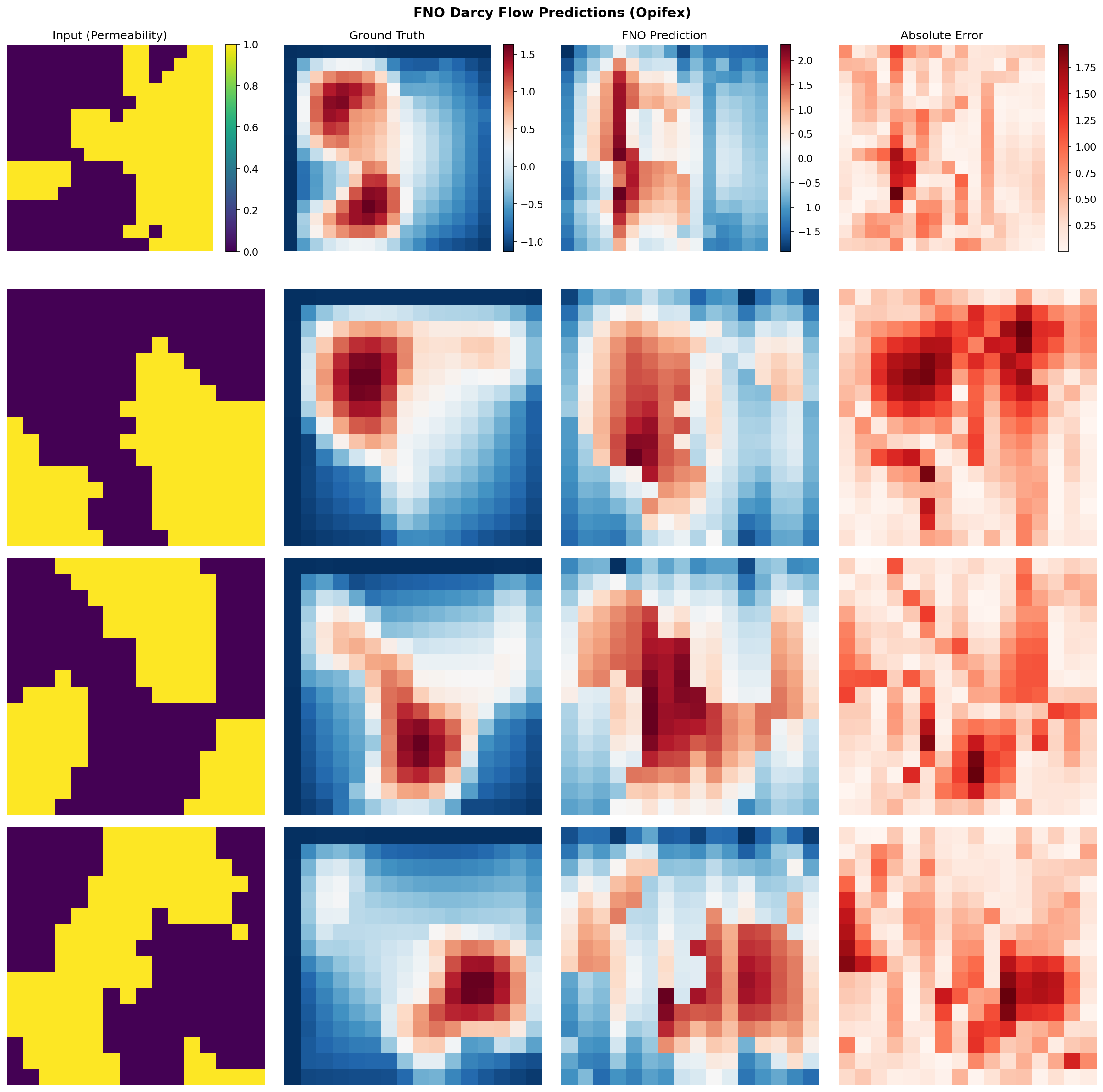
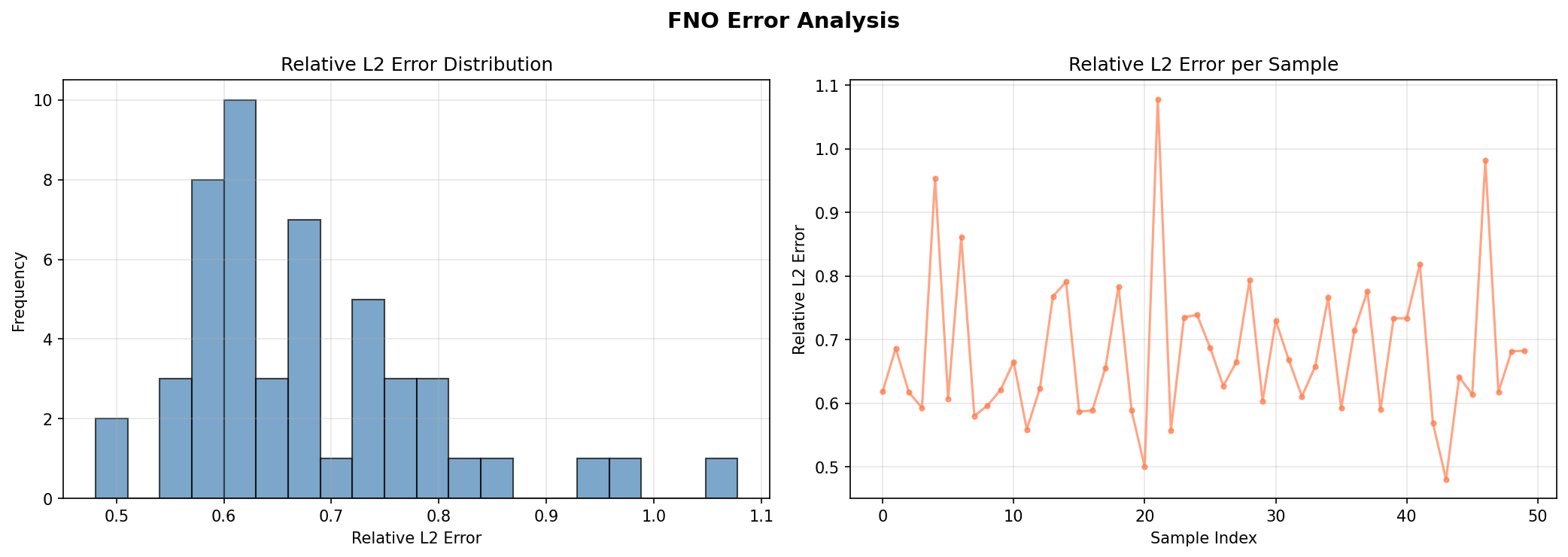
Generate full visualizations including sample predictions, error maps, and error distribution analysis.
n_vis = min(4, len(x_test))
fig, axes = plt.subplots(n_vis, 4, figsize=(16, 4 * n_vis))
fig.suptitle(
    "FNO Darcy Flow Predictions (Opifex)", fontsize=14, fontweight="bold"
)

for i in range(n_vis):
    axes[i, 0].imshow(x_test[i, 0], cmap="viridis")    # Input (permeability)
    axes[i, 1].imshow(y_test[i, 0], cmap="RdBu_r")     # Ground truth
    axes[i, 2].imshow(pred_np, cmap="RdBu_r")           # FNO prediction
    error = np.abs(pred_np - y_test[i, 0])
    axes[i, 3].imshow(error, cmap="Reds")               # Absolute error

plt.savefig(OUTPUT_DIR / "sample_predictions.png", dpi=150, bbox_inches="tight")
Terminal Output:
Generating visualizations...
Sample predictions saved to docs/assets/examples/fno_darcy/sample_predictions.png
Error analysis saved to docs/assets/examples/fno_darcy/error_analysis.png
Sample Predictions
Error Analysis
Results Summary
Terminal Output:
======================================================================
FNO Darcy Flow example completed in 18.4s
Test MSE: 4.024144e-06, Relative L2: 0.007588
Results saved to: docs/assets/examples/fno_darcy
======================================================================
| Metric | Value | Notes |
|---|---|---|
| Train Relative L2 | 0.004973 | Mean relative L2 on the training set (physical units) |
| Test Relative L2 | 0.007588 | Mean relative L2 on the test set (physical units) |
| Min Relative L2 | 0.004003 | Best per-sample test relative L2 |
| Max Relative L2 | 0.021948 | Worst per-sample test relative L2 |
| Test MSE | 4.02e-06 | Mean squared error on the test set |
| Final Train Loss | 6.62e-3 | Relative-L2 training loss at epoch 200 |
| Final Val Loss | 1.83e-4 | Relative-L2 validation loss at epoch 200 |
| Training Time | 18.4s | On GPU (CudaDevice) |
| Total Parameters | 2,368,001 | FNO + GridEmbedding2D |
What We Achieved
- Composed
GridEmbedding2DwithFourierNeuralOperatorin a cleannnx.Modulesubclass - Trained on Opifex's synthetic Darcy data with the relative-L2 loss,
AdamW+ weight decay, and an exponential learning-rate schedule viaTrainer.fit() - Evaluated with per-sample L2 relative error and an explicit train-vs-test overfitting check
- Generated prediction comparison and error distribution visualizations
Interpretation
This example demonstrates the full Opifex neural operator workflow on Opifex's own Darcy data. The FNO reaches a train relative L2 around 0.50% and a test relative L2 around 0.76% in physical pressure units, with a sub-0.3% train-vs-test gap. The relative-L2 loss, weight decay, and LR schedule together drive accurate operator learning without overfitting, consistent with the UNO and Your First Neural Operator examples on the same data.
Next Steps
Experiments to Try
- Swap the loss: Compare the relative-L2 objective against an H1 (Sobolev) gradient-aware loss to penalize errors in the field gradients as well as the values
- Tune the schedule: Adjust
LR_DECAY_RATE/LR_TRANSITION_STEPSor switchschedule_typetocosine - Tune regularization: Increase
WEIGHT_DECAY(1e-3 .. 1e-2) to trade train fit for generalization - Tune Fourier modes: Try larger
MODESorHIDDEN_WIDTHfor more capacity - Raise the resolution: Generate
create_darcy_loaderdata at 64x64 for a sharper benchmark
Related Examples
| Example | Level | What You'll Learn |
|---|---|---|
| Grid Embeddings | Beginner | Spatial coordinate injection for neural operators |
| DISCO Convolutions | Intermediate | Discrete-continuous convolutions for arbitrary grids |
| UNO on Darcy Flow | Intermediate | Multi-resolution U-shaped neural operator for Darcy flow |
| SFNO Climate | Intermediate | Spherical FNO for climate modeling on the sphere |
| U-FNO Turbulence | Intermediate | U-Net enhanced FNO for turbulence problems |
| Neural Operator Benchmark | Advanced | Cross-architecture comparison (FNO, UNO, SFNO, U-FNO) |
API Reference
FourierNeuralOperator- FNO model class with spectral convolution layersGridEmbedding2D- 2D spatial coordinate embedding layerTrainer- Unified training orchestration with JIT compilationTrainingConfig- Training hyperparameter configurationOptimizationConfig- Optimizer, weight decay, and LR-schedule configuration
Troubleshooting
OOM during training
Symptom: jaxlib.xla_extension.XlaRuntimeError: RESOURCE_EXHAUSTED
Cause: Model or batch size exceeds available GPU memory, especially at higher resolutions.
Solution:
# Option 1: Reduce batch size
config = TrainingConfig(batch_size=16, ...)  # Was 32

# Option 2: Enable gradient checkpointing via TrainingConfig
config = TrainingConfig(gradient_checkpointing=True, gradient_checkpoint_policy="dots_saveable")

# Option 3: Use mixed precision
X_train = X_train.astype(jnp.bfloat16)  # 40-50% memory reduction
NaN in training loss
Symptom: Loss becomes nan after a few epochs.
Cause: Learning rate too high or numerical instability in spectral convolutions.
Solution:
# Reduce learning rate and add gradient clipping
import optax

optimizer = optax.chain(
    optax.clip_by_global_norm(1.0),
    optax.adam(1e-4),  # Reduced from 1e-3
)
Shape mismatch after grid embedding
Symptom: ValueError about incompatible shapes when composing GridEmbedding2D with FourierNeuralOperator.
Cause: GridEmbedding2D expects channels-last format (batch, H, W, channels), while FourierNeuralOperator uses channels-first (batch, channels, H, W).
Solution: Use jnp.moveaxis to convert between layouts, as shown in the FNOWithEmbedding class: