Your First PINN: Solving the Poisson Equation
| Metadata | Value |
|---|---|
| Level | Beginner |
| Runtime | ~30 seconds (GPU) / ~1 min (CPU) |
| Prerequisites | Basic Python, calculus |
| Format | Python + Jupyter |
| Memory | ~500 MB RAM |
Overview
This tutorial demonstrates Physics-Informed Neural Networks (PINNs) using Opifex's high-level APIs. You'll learn to solve PDEs WITHOUT any training data, using only the governing equation and Opifex's built-in solver infrastructure.
Opifex APIs demonstrated:
- Interval: 1D geometry class for computational domains
- create_poisson_pinn: Factory function for creating Poisson PINN models
- PINNSolver: High-level solver with generic
solve()method - poisson_residual: Factory function to create PDE residual (explicit, not hidden)
- PINNConfig: Configuration composing with PhysicsLossConfig for loss weights
Problem: Find u(x) satisfying:
- PDE: -u''(x) = π² sin(πx) on [-1, 1]
- Boundary Conditions: u(-1) = u(1) = 0
- Exact Solution: u(x) = sin(πx)
We'll achieve <0.2% L2 relative error in just 2000 iterations (~30 seconds).
What You'll Learn
- Understand the PINN paradigm: embedding physics into the loss function
- Use
Intervalgeometry for 1D domains - Use
create_poisson_pinnfactory for creating PINN architectures - Use
poisson_residualfactory to create PDE residual functions - Configure training with
PINNConfig(iterations, learning rate, loss weights) - Solve using
PINNSolver.solve()with explicit residual functions - Evaluate against the known analytical solution
Coming from DeepXDE?
If you're familiar with DeepXDE, here's how Opifex compares:
| DeepXDE | Opifex (JAX) |
|---|---|
dde.geometry.Interval(-1, 1) |
Interval(-1.0, 1.0) |
dde.nn.FNN([1, 50, 50, 50, 1], "tanh") |
create_poisson_pinn(spatial_dim=1, hidden_dims=[50,50,50]) |
| Manual loss weight tuning | PINNConfig(loss_config=PhysicsLossConfig(...)) |
model.train(iterations=2000) |
PINNSolver(pinn).solve(geometry, residual_fn, bc_fn) |
model.compile("adam", lr=1e-3) |
PINNConfig(learning_rate=1e-3) |
| String-based PDE selection | poisson_residual(source_fn) — explicit factory |
Key differences:
- Factory Functions for PDEs:
poisson_residual(),heat_residual(), etc. — explicit, type-safe, infinitely extensible - Composition Pattern:
PINNConfigcomposes withPhysicsLossConfigfor loss weights - Generic Solve API:
solve(geometry, residual_fn, bc_fn)— same method for any PDE - XLA JIT compilation: 2-3x faster training via automatic compilation
Files
- Python Script:
examples/getting-started/first_pinn.py - Jupyter Notebook:
examples/getting-started/first_pinn.ipynb
Quick Start
Run the Python Script
Run the Jupyter Notebook
Core Concepts
The PINN Paradigm
Traditional neural networks learn from data: given (input, output) pairs, minimize prediction error. PINNs take a fundamentally different approach: they learn from physics.
graph TB
    subgraph Traditional["Traditional ML"]
        A1["Training Data<br/>(x, u) pairs"] --> B1["Neural Network"]
        B1 --> C1["Minimize<br/>||u_pred - u_data||²"]
    end

    subgraph PINN["Physics-Informed NN"]
        A2["Collocation Points<br/>x samples"] --> B2["Neural Network<br/>u_θ(x)"]
        B2 --> C2["Minimize<br/>||PDE Residual||² + ||BC Error||²"]
    end

    style Traditional fill:#fff3e0,stroke:#f57c00
    style PINN fill:#e3f2fd,stroke:#1976d2
The Poisson Equation
The 1D Poisson equation is:
With source term f(x) = π² sin(πx) and boundary conditions u(-1) = u(1) = 0, the exact solution is u(x) = sin(πx).
This is the perfect first PINN example because:
- Known exact solution — we can measure error precisely
- Simple 1D domain — easy to visualize
- Linear PDE — stable training dynamics
Opifex PINN Architecture
Opifex provides a high-level API that handles all the complexity:
graph LR
    subgraph Input["User Provides"]
        A["Geometry<br/>(Interval)"]
        B["poisson_residual()<br/>factory"]
        C["Boundary values<br/>bc_fn"]
    end

    subgraph Opifex["PINNSolver.solve()"]
        D["AutoDiffEngine<br/>∇²u(x)"]
        E["PhysicsLossComposer<br/>weighted losses"]
        F["Training Loop<br/>Adam optimizer"]
    end

    subgraph Output["Returns"]
        G["PINNResult<br/>model, losses, metrics"]
    end

    A --> F
    B --> D
    C --> E
    D --> E
    E --> F
    F --> G

    style D fill:#e3f2fd,stroke:#1976d2
style E fill:#e3f2fd,stroke:#1976d2Implementation
Step 1: Imports
from pathlib import Path

import jax
import jax.numpy as jnp
import matplotlib as mpl
from flax import nnx

from opifex.geometry import Interval
from opifex.neural.pinns import create_poisson_pinn
from opifex.solvers import PINNConfig, PINNSolver, poisson_residual
Terminal Output:
============================================================
Your First PINN: 1D Poisson Equation (Opifex APIs)
============================================================
JAX backend: gpu
Step 2: Define the Problem
def exact_solution(x):
    """Analytical solution: u(x) = sin(pi*x)."""
    return jnp.sin(jnp.pi * x)

def source_term(x):
    """Source term: f(x) = pi^2 * sin(pi*x)."""
    return jnp.pi**2 * jnp.sin(jnp.pi * x)

def boundary_condition(x):
    """Boundary condition: u = 0 at boundaries."""
    return jnp.zeros_like(x[..., 0])
Step 3: Define the Geometry
Use Opifex's Interval class for 1D domains:
Terminal Output:
Step 4: Create the PINN Model
Use create_poisson_pinn factory to create an appropriate architecture:
Terminal Output:
Creating PINN model using create_poisson_pinn()...
  Architecture: 1 -> 50 -> 50 -> 50 -> 1
  Parameters: 5,251
  Activation: tanh
Step 5: Create PDE Residual
Use poisson_residual() factory to create the residual function:
Terminal Output:
Creating PDE residual using poisson_residual() factory...
  PDE: -∇²u = π² sin(πx)
  Residual: -∇²u - f(x) = 0
Step 6: Configure and Solve
Configure training with PINNConfig and solve with PINNSolver:
config = PINNConfig(
    n_interior=100,          # Interior collocation points
    n_boundary=2,            # Boundary points (just endpoints for 1D)
    num_iterations=2000,     # Training iterations
    learning_rate=1e-3,      # Adam learning rate
    print_every=500,         # Print loss every N iterations
    seed=42,
)

solver = PINNSolver(pinn)
result = solver.solve(
    geometry=geometry,
    residual_fn=residual_fn,
    bc_fn=boundary_condition,
    config=config,
)
Terminal Output:
Configuring solver with PINNConfig...
  Interior points: 100
  Boundary points: 2
  Iterations: 2000
  Learning rate: 0.001
  Physics loss weight: 1.0
  Boundary loss weight: 100.0

Solving with PINNSolver.solve()...
--------------------------------------------------
  Iteration    0: loss = 5.257140e+01
  Iteration  500: loss = 1.608088e-02
  Iteration 1000: loss = 5.250988e-03
  Iteration 1500: loss = 1.302604e-02
  Iteration 1999: loss = 1.767788e-03
--------------------------------------------------
Training completed in 2.3s
Final loss: 1.767788e-03
Step 7: Evaluation
# Dense evaluation grid
x_eval = jnp.linspace(-1, 1, 200).reshape(-1, 1)
u_pred = result.model(x_eval).squeeze()
u_exact = exact_solution(x_eval.squeeze())

# Compute errors
l2_error = jnp.sqrt(jnp.mean((u_pred - u_exact) ** 2))
l2_relative = l2_error / jnp.sqrt(jnp.mean(u_exact**2))
max_error = jnp.max(jnp.abs(u_pred - u_exact))
Terminal Output:
Evaluating solution...

============================================================
RESULTS
============================================================
  L2 Absolute Error:  0.001071
  L2 Relative Error:  0.1518%
  Maximum Error:      0.001853
============================================================

Saved: docs/assets/examples/first_pinn/solution.png

PINN example completed successfully!
Achieved 0.1518% L2 relative error with 5,251 parameters

Opifex APIs demonstrated:
  - Interval (1D geometry)
  - create_poisson_pinn (PINN factory)
  - poisson_residual (PDE residual factory)
  - PINNSolver.solve (generic solver)
  - PINNConfig (solver configuration)
Visualization
The PINN learns the exact sine solution with excellent accuracy:
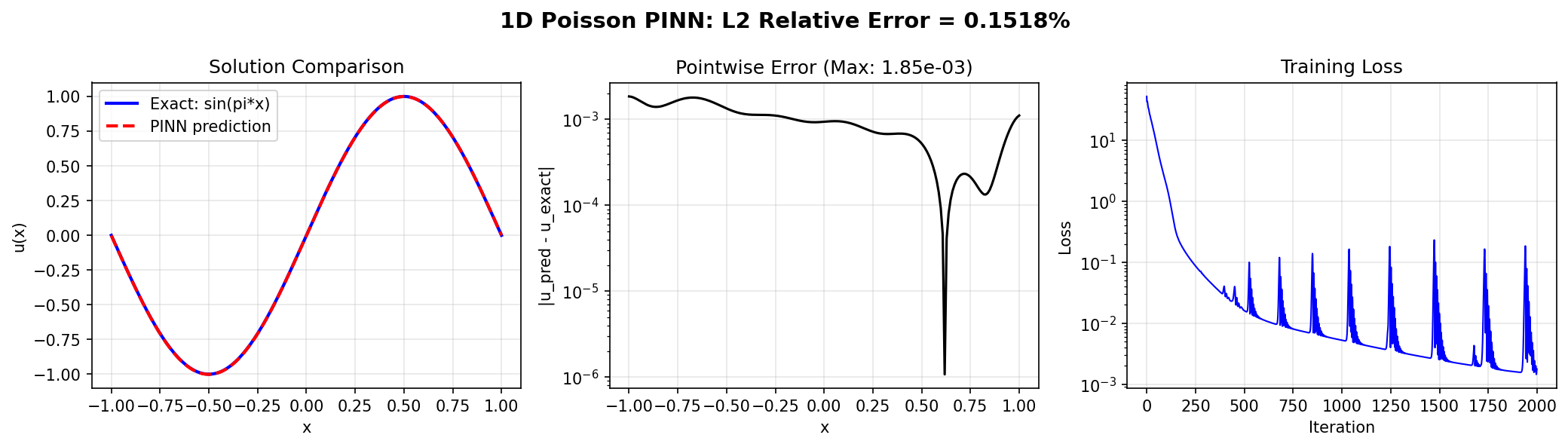
The plot shows:
- Left: PINN prediction overlaid on exact solution (nearly identical)
- Center: Pointwise absolute error on log scale (max ~1.9e-3)
- Right: Training loss convergence over 2000 iterations
Results Summary
| Metric | Value |
|---|---|
| L2 Absolute Error | 0.001071 |
| L2 Relative Error | 0.1518% |
| Maximum Error | 0.001853 |
| Final Loss | 1.77e-03 |
| Parameters | 5,251 |
| Training Iterations | 2,000 |
| Runtime | ~2-3 sec (GPU) |
Next Steps
Experiments to Try
- Increase iterations: Train for 5000+ iterations for even lower error
- Vary architecture: Try
hidden_dims=[100, 100]or[32, 32, 32, 32] - Adjust loss weights: Customize
PINNConfig.loss_configfor different BC enforcement - Custom residuals: Define your own residual function for any PDE
Related Examples
| Example | Level | What You'll Learn |
|---|---|---|
| Poisson 2D | Intermediate | Same problem in 2D |
| Burgers Equation | Intermediate | Nonlinear PDE with shocks |
| Heat Equation | Intermediate | Time-dependent parabolic PDE |
| First Neural Operator | Beginner | Data-driven operator learning |
API Reference
Interval— 1D geometry classcreate_poisson_pinn— PINN factory functionPINNSolver— High-level PINN solverPINNConfig— Solver configurationpoisson_residual— Poisson residual factory
Troubleshooting
Loss doesn't decrease
Symptom: Loss stays near initial value after many iterations.
Cause: Learning rate too low or network too small.
Solution: Increase learning rate or add more hidden units:
config = PINNConfig(
    learning_rate=1e-2,  # Higher learning rate
    num_iterations=2000,
)

# Or use larger network
pinn = create_poisson_pinn(
    spatial_dim=1,
    hidden_dims=[100, 100, 100],  # Larger
    rngs=nnx.Rngs(42),
)
Boundary conditions not satisfied
Symptom: Large error at x = -1 and x = 1.
Cause: BC loss weight too low relative to PDE loss.
Solution: Customize the loss_config in PINNConfig:
from opifex.core.physics.losses import PhysicsLossConfig

config = PINNConfig(
    loss_config=PhysicsLossConfig(
        physics_loss_weight=1.0,
        boundary_loss_weight=1000.0,  # Was 100.0
    ),
)
NaN in loss
Symptom: Loss becomes nan after a few iterations.
Cause: Learning rate too high or numerical instability.
Solution: Reduce learning rate: