UNO on Darcy Flow
| Metadata | Value |
|---|---|
| Level | Intermediate |
| Runtime | ~5 min (CPU) / ~38 sec (GPU) |
| Prerequisites | JAX, Flax NNX, Neural Operators basics |
| Format | Python + Jupyter |
| Memory | ~2 GB RAM |
Overview
This tutorial demonstrates the U-shaped Neural Operator (U-NO) of Rahman et al. (2022) for solving the Darcy flow equation using the Opifex framework. U-NO arranges Fourier spectral convolutions in a U-shaped encoder-decoder, but -- unlike a conv U-Net -- it changes spatial resolution only in the Fourier domain (no strided convolutions, no pixel pooling or interpolation). This makes it discretisation invariant, enabling genuine zero-shot super-resolution: a model trained at one grid resolution predicts accurately at a finer one without any fine-tuning.
You will build a UNO model using Opifex's create_uno factory, apply the standard
operator-learning recipe (grid positional embedding, Gaussian normalization, and the
relative-L2 loss), load Darcy flow training data with the datarax-based
create_darcy_loader, train with the Trainer / TrainingConfig API, evaluate
predictions on the test set, and then demonstrate zero-shot super-resolution by running
inference at 2x the training resolution.
What You'll Learn
- Create a UNO model with the
create_unofactory function - Apply the operator-learning recipe:
GridEmbedding2D, Gaussian normalization, relative-L2 loss - Load Darcy flow data using
create_darcy_loader(dataraxPDELoaders) - Train with Opifex's
Trainer.fit()API andTrainingConfig - Evaluate predictions using MSE and relative L2 error
- Demonstrate zero-shot super-resolution at higher resolutions than training
Coming from NeuralOperator (PyTorch)?
If you are familiar with the neuraloperator library, here is how the UNO workflow
compares:
| NeuralOperator (PyTorch) | Opifex (JAX) |
|---|---|
UNO(in_channels, out_channels, hidden_channels, uno_out_channels, uno_n_modes, uno_scalings, ...) |
create_uno(in_channels=, out_channels=, hidden_channels=, uno_out_channels=, uno_n_modes=, uno_scalings=, rngs=) |
torch.utils.data.DataLoader(dataset) |
create_darcy_loader(n_samples=, batch_size=, resolution=) (datarax PDELoaders) |
trainer = Trainer(model, ...) then trainer.train(...) |
Trainer(model=, config=, rngs=) then trainer.fit(train_data, val_data) |
model.eval(); with torch.no_grad(): ... |
trained_model(x, deterministic=True) |
Manual torch.meshgrid for grid embeddings |
GridEmbedding2D(in_channels=, grid_boundaries=) |
| Direct inference at a new resolution (Fourier-domain resize) | Same -- feed a finer grid straight through the trained model |
Key differences:
- Factory function: Opifex provides
create_unofor streamlined model construction instead of direct class instantiation - Explicit PRNG: Opifex uses JAX's explicit
rngs=nnx.Rngs(42)instead of global random state - XLA compilation: Automatic JIT compilation during
Trainer.fit()for significant speedups - datarax data loading: Efficient, reproducible batching via datarax
PDELoaders(a frozen.train/.valpair) instead of PyTorch DataLoader
Files
- Python Script:
examples/neural-operators/uno_darcy.py - Jupyter Notebook:
examples/neural-operators/uno_darcy.ipynb
Quick Start
Run the Python Script
Run the Jupyter Notebook
Core Concepts
The U-Net Neural Operator (UNO)
The U-NO architecture arranges Fourier spectral convolutions in a U-shaped
encoder-decoder. The encoder reduces spatial resolution while increasing channel width;
the decoder restores it. Crucially, every resolution change happens inside the
spectral convolution -- the inverse FFT is simply taken at the target grid size
(uno_scalings[i] per block) -- so there are no strided convolutions and no pixel
pooling or interpolation. Horizontal U-skips connect encoder and decoder stages,
resampling the stored features in Fourier space before concatenation. Because all
operations are spectral, the operator has a global receptive field and is
discretisation invariant: the same weights apply at any grid resolution.
graph TB
    A["Input (32x32x1)<br/>Permeability a(x)"] --> A2["Grid Embedding<br/>1 -> 3 channels (+x,y)"]
    A2 --> B["Lifting ChannelMLP<br/>3 -> 64 channels"]
    B --> C["Block 0<br/>SpectralConv, scale 1.0 (32x32)"]
    C --> D["Block 1<br/>SpectralConv, scale 0.5 (16x16)"]
    D --> E["Block 2<br/>SpectralConv, scale 1.0 (16x16)"]
    E --> F["Block 3<br/>SpectralConv, scale 2.0 (32x32)"]
    F --> G["Block 4<br/>SpectralConv, scale 1.0 (32x32)"]
    G --> H["Projection ChannelMLP<br/>32 -> 1 channels"]
    H --> I["Output (32x32x1)<br/>Pressure u(x)"]

    C -.->|Horizontal U-skip (Fourier resample)| G
    D -.->|Horizontal U-skip (Fourier resample)| F

    style A fill:#e3f2fd,stroke:#1976d2
    style I fill:#c8e6c9,stroke:#388e3c
    style E fill:#fff3e0,stroke:#f57c00
Darcy Flow Problem
The Darcy flow equation models steady-state fluid flow through porous media:
| Variable | Meaning | Role |
|---|---|---|
| \(a(x)\) | Permeability field | Input function |
| \(u(x)\) | Pressure field | Output function (to learn) |
| \(f(x)\) | Forcing term | Fixed constant |
The neural operator learns the mapping \(a(x) \mapsto u(x)\) from data.
Zero-Shot Super-Resolution
Because neural operators learn mappings between continuous function spaces rather than between fixed grids, a model trained at one resolution can be evaluated at any other. A finer permeability field is fed directly through the trained model -- the spectral convolutions resize entirely in the Fourier domain, so no interpolation of the input is needed. We test this honestly: against a separately generated, real 64x64 Darcy solve (true PDE solutions on the fine grid), not a bilinear upsample of the coarse solution. This property is intrinsic to the spectral formulation and requires no retraining.
Why Zero-Shot Super-Resolution Matters
Traditional CNNs are tied to their training resolution. Neural operators like UNO learn resolution-independent mappings, enabling predictions at arbitrary resolutions -- useful when you need high-fidelity output but can only afford to train on coarse grids.
Implementation
Step 1: Imports and Setup
import time
import warnings
from pathlib import Path

warnings.filterwarnings("ignore")

import jax
import jax.numpy as jnp
import matplotlib as mpl
import numpy as np
from flax import nnx

mpl.use("Agg")
import matplotlib.pyplot as plt

# Opifex framework imports
from opifex.core.evaluation import predict_in_batches
from opifex.core.metrics import per_sample_relative_l2
from opifex.core.training import Trainer, TrainingConfig
from opifex.core.training.config import LossConfig
from opifex.data.loaders import create_darcy_loader
from opifex.neural.operators.common.embeddings import GridEmbedding2D
from opifex.neural.operators.specialized import create_uno

print("=" * 70)
print("Opifex Example: UNO on Darcy Flow")
print("=" * 70)
print(f"JAX backend: {jax.default_backend()}")
print(f"JAX devices: {jax.devices()}")
Terminal Output:
======================================================================
Opifex Example: UNO on Darcy Flow
======================================================================
JAX backend: gpu
JAX devices: [CudaDevice(id=0)]
Step 2: Configuration
All experiment hyperparameters are defined as simple Python variables -- no YAML configuration files required. We follow the standard operator-learning recipe: ~1000 training samples, Gaussian normalization, the relative-L2 loss, and enough epochs for the spectral weights to converge.
RESOLUTION = 32
N_TRAIN = 1000
N_TEST = 100
BATCH_SIZE = 32
NUM_EPOCHS = 120
LEARNING_RATE = 1e-3
HIDDEN_CHANNELS = 64
SEED = 42

OUTPUT_DIR = Path("docs/assets/examples/uno_darcy")
OUTPUT_DIR.mkdir(parents=True, exist_ok=True)

print(f"Resolution: {RESOLUTION}x{RESOLUTION}")
print(f"Training samples: {N_TRAIN}, Test samples: {N_TEST}")
print(f"Batch size: {BATCH_SIZE}, Epochs: {NUM_EPOCHS}")
print(f"UNO config: hidden={HIDDEN_CHANNELS}, 5-layer Fourier U (Rahman et al. 2022)")
Terminal Output:
Resolution: 32x32
Training samples: 1000, Test samples: 100
Batch size: 32, Epochs: 120
UNO config: hidden=64, 5-layer Fourier U (Rahman et al. 2022)
Step 3: Data Loading with datarax
Opifex provides create_darcy_loader which generates Darcy flow equation data
(permeability-to-pressure mapping) and returns a frozen PDELoaders bundle with
.train and .val datarax pipelines. The split between train and validation is
controlled by val_fraction. datarax yields channels-first batches
({"input": (b, 1, H, W), "output": (b, 1, H, W)}), so since UNO works
channels-last we move the channel axis to the end once, at the data boundary.
n_samples = N_TRAIN + N_TEST
loaders = create_darcy_loader(
    n_samples=n_samples,
    batch_size=BATCH_SIZE,
    resolution=RESOLUTION,
    val_fraction=N_TEST / n_samples,
    seed=SEED,
)


# datarax yields channels-first {"input": (b, 1, H, W), "output": (b, 1, H, W)};
# UNO (and its grid embedding, eval, and visualization) work channels-last, so
# we move the channel axis to the end once here, at the data boundary.
def _collect(pipeline):
    inputs, outputs = [], []
    for batch in pipeline:
        inputs.append(np.moveaxis(np.asarray(batch["input"]), 1, -1))
        outputs.append(np.moveaxis(np.asarray(batch["output"]), 1, -1))
    return np.concatenate(inputs, axis=0), np.concatenate(outputs, axis=0)


X_train, Y_train = _collect(loaders.train)
X_test, Y_test = _collect(loaders.val)

print(f"Training data: X={X_train.shape}, Y={Y_train.shape}")
print(f"Test data:     X={X_test.shape}, Y={Y_test.shape}")
Terminal Output:
Loading Darcy flow data via datarax...
Training data: X=(1024, 32, 32, 1), Y=(1024, 32, 32, 1)
Test data:     X=(128, 32, 32, 1), Y=(128, 32, 32, 1)
Step 4: Normalization
Neural operators train best on standardized fields. We fit Gaussian statistics on the training set, normalize all splits, and un-normalize predictions before computing physical-space errors.
x_mean, x_std = X_train.mean(), X_train.std()
y_mean, y_std = Y_train.mean(), Y_train.std()

X_train_n = (X_train - x_mean) / x_std
Y_train_n = (Y_train - y_mean) / y_std
X_test_n = (X_test - x_mean) / x_std
Y_test_n = (Y_test - y_mean) / y_std

print(f"Input mean/std:  {x_mean:.4f} / {x_std:.4f}")
print(f"Output mean/std: {y_mean:.6f} / {y_std:.6f}")
Terminal Output:
Step 5: Model Creation
The create_uno factory builds a U-shaped Neural Operator with a reference Darcy
configuration (five Fourier blocks, channels [32, 64, 64, 64, 32], modes [8, 8],
and per-block scalings whose product is 1.0). We wrap it with GridEmbedding2D, which
appends normalized (x, y) coordinate channels to the permeability input -- the
standard positional encoding that lets spectral operators resolve boundary-value
problems. The grid embedding works on the channels-last input; the wrapper transposes
into the operator's channels-first layout and back.
class UNOWithGrid(nnx.Module):
    """UNO with a 2D grid positional embedding on the (channels-last) input."""

    def __init__(
        self,
        input_channels: int,
        output_channels: int,
        hidden_channels: int,
        *,
        rngs: nnx.Rngs,
    ) -> None:
        super().__init__()
        self.grid_embedding = GridEmbedding2D(
            in_channels=input_channels,
            grid_boundaries=[[0.0, 1.0], [0.0, 1.0]],
        )
        # Reference Darcy config (Rahman et al. 2022): end-to-end spatial scaling 1.0.
        self.uno = create_uno(
            in_channels=self.grid_embedding.out_channels,
            out_channels=output_channels,
            hidden_channels=hidden_channels,
            uno_out_channels=[32, 64, 64, 64, 32],
            uno_n_modes=[[8, 8], [8, 8], [4, 4], [8, 8], [8, 8]],
            uno_scalings=[[1.0, 1.0], [0.5, 0.5], [1.0, 1.0], [2.0, 2.0], [1.0, 1.0]],
            n_layers=5,
            rngs=rngs,
        )

    def __call__(self, x: jax.Array, *, deterministic: bool = True) -> jax.Array:
        x_embedded = self.grid_embedding(x)
        x_cf = jnp.transpose(x_embedded, (0, 3, 1, 2))
        y_cf = self.uno(x_cf, deterministic=deterministic)
        return jnp.transpose(y_cf, (0, 2, 3, 1))


in_channels = X_train.shape[-1]
out_channels = Y_train.shape[-1]

model = UNOWithGrid(
    input_channels=in_channels,
    output_channels=out_channels,
    hidden_channels=HIDDEN_CHANNELS,
    rngs=nnx.Rngs(SEED),
)

# Count parameters
params = nnx.state(model, nnx.Param)
param_count = sum(x.size for x in jax.tree_util.tree_leaves(params))
print(f"Model: UNO + GridEmbedding2D (hidden={HIDDEN_CHANNELS}, 5-layer Fourier U)")
print(f"Input channels: {in_channels} (+ 2 grid coords = {in_channels + 2} after embedding)")
print(f"Output channels: {out_channels}")
print(f"Total parameters: {param_count:,}")
Terminal Output:
Creating UNO model with grid embedding...
Model: UNO + GridEmbedding2D (hidden=64, 5-layer Fourier U)
Input channels: 1 (+ 2 grid coords = 3 after embedding)
Output channels: 1
Total parameters: 4,260,129
Parameter Count
The five-block U-NO with hidden_channels=64 contains roughly 4.3M parameters. The
dense spectral weights (per block: in x out x modes_h x modes_w) dominate the
count. The grid embedding adds only the handful of weights needed for the two extra
input coordinate channels.
Step 6: Training with Opifex Trainer
The Trainer handles batched training with JIT compilation, validation, and progress
logging. We train with the relative-L2 loss (loss_type="relative_l2"), the standard
operator-learning objective. Pass training and validation data as tuples of JAX arrays.
config = TrainingConfig(
    num_epochs=NUM_EPOCHS,
    learning_rate=LEARNING_RATE,
    batch_size=BATCH_SIZE,
    validation_frequency=5,
    verbose=True,
    loss_config=LossConfig(loss_type="relative_l2"),
)

trainer = Trainer(
    model=model,
    config=config,
    rngs=nnx.Rngs(SEED),
)

print(f"Optimizer: Adam (lr={LEARNING_RATE}), loss: relative L2")

print("Starting training...")
start_time = time.time()

trained_model, metrics = trainer.fit(
    train_data=(jnp.array(X_train_n), jnp.array(Y_train_n)),
    val_data=(jnp.array(X_test_n), jnp.array(Y_test_n)),
)

training_time = time.time() - start_time
print(f"Training completed in {training_time:.1f}s")
print(f"Final train loss: {metrics.get('final_train_loss', 'N/A')}")
print(f"Final val loss:   {metrics.get('final_val_loss', 'N/A')}")
Terminal Output:
Setting up Trainer...
Optimizer: Adam (lr=0.001), loss: relative L2

Starting training...
Training completed in 32.7s
Final train loss: 0.010994615033268929
Final val loss:   0.0006106115761213005
Step 7: Evaluation
Predictions are un-normalized back to physical pressure before measuring the relative L2 error. The test set is run through the model in batches to bound memory use at higher resolutions.
X_test_jnp = jnp.array(X_test_n)
Y_test_jnp = jnp.array(Y_test)

predictions = (
    predict_in_batches(lambda b: trained_model(b, deterministic=True), X_test_jnp) * y_std
    + y_mean
)

test_mse = float(jnp.mean((predictions - Y_test_jnp) ** 2))

per_sample_rel_l2 = per_sample_relative_l2(predictions, Y_test_jnp)
mean_rel_l2 = float(jnp.mean(per_sample_rel_l2))

print(f"Test MSE:         {test_mse:.6e}")
print(f"Test Relative L2: {mean_rel_l2:.6f}")
print(f"Min Relative L2:  {float(jnp.min(per_sample_rel_l2)):.6f}")
print(f"Max Relative L2:  {float(jnp.max(per_sample_rel_l2)):.6f}")
Terminal Output:
Evaluating on test set...
Test MSE:         1.029011e-05
Test Relative L2: 0.012214
Min Relative L2:  0.005707
Max Relative L2:  0.040444
Step 8: Zero-Shot Super-Resolution
Test the trained UNO at 2x the training resolution without any retraining. We generate a separate, real 64x64 Darcy test set (true PDE solutions on the fine grid), normalize the inputs with the train-fitted statistics, feed them straight through the model, and compare against the real high-resolution solutions.
target_resolution = RESOLUTION * 2
print(f"Testing zero-shot super-resolution: {RESOLUTION} -> {target_resolution}")

# Generate a real high-resolution Darcy test set (true solves, independent samples).
sr_loaders = create_darcy_loader(
    n_samples=N_TEST,
    batch_size=BATCH_SIZE,
    resolution=target_resolution,
    val_fraction=1.0,
    seed=SEED + 1,
)
x_high, y_high = _collect(sr_loaders.val)
x_high_n = jnp.array((x_high - x_mean) / x_std)  # train-fitted normalization
y_high_jnp = jnp.array(y_high)

# Feed the finer grid directly through the model (Fourier-domain resize, no upsample).
pred_high = (
    predict_in_batches(lambda b: trained_model(b, deterministic=True), x_high_n) * y_std
    + y_mean
)
sr_error = float(jnp.mean(per_sample_relative_l2(pred_high, y_high_jnp)))
print(f"Super-resolution mean relative L2: {sr_error:.6f}")
Terminal Output:
Testing zero-shot super-resolution: 32 -> 64
Generating a real 64x64 Darcy test set...
Super-resolution mean relative L2 (128 real 64^2 solves): 0.040195
  (in-distribution 32^2 error was 0.012214)
Interpreting Super-Resolution Error
The super-resolution error is measured against real 64x64 Darcy solutions, not a bilinear upsample of the coarse truth, so it is an honest test of discretisation invariance. At 0.040 mean relative L2 -- only ~3x the in-distribution 0.012 -- the U-NO genuinely generalizes across resolutions. Because all resolution changes happen in the Fourier domain, the same spectral weights apply at the finer grid with no retraining; a conv U-Net (strided convs + pixel pooling) cannot do this and degrades to ~0.23 here.
Visualizations
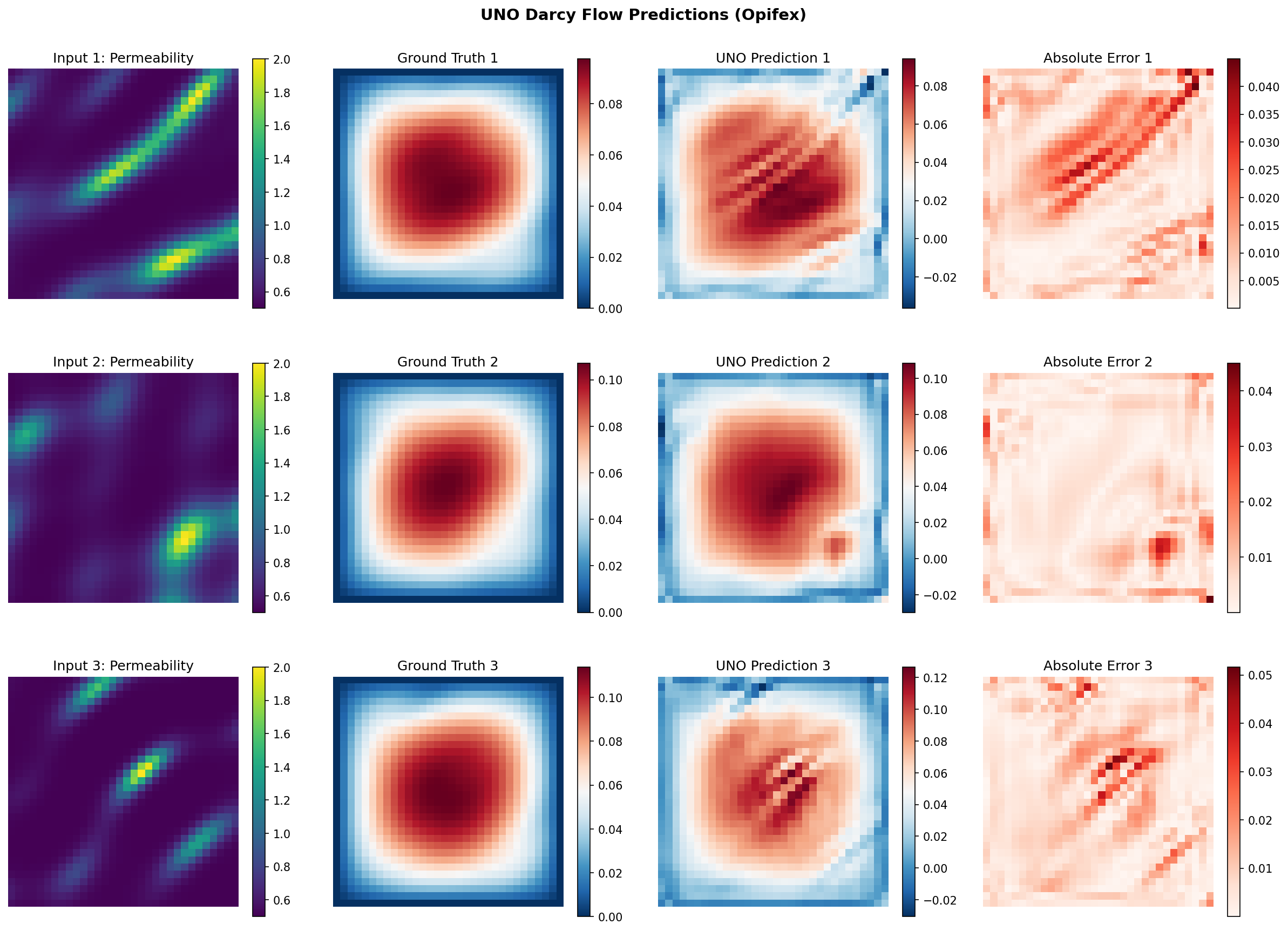
Prediction Comparison
The visualization below shows the input permeability field, ground truth pressure solution, UNO prediction, and point-wise absolute error for a test sample.
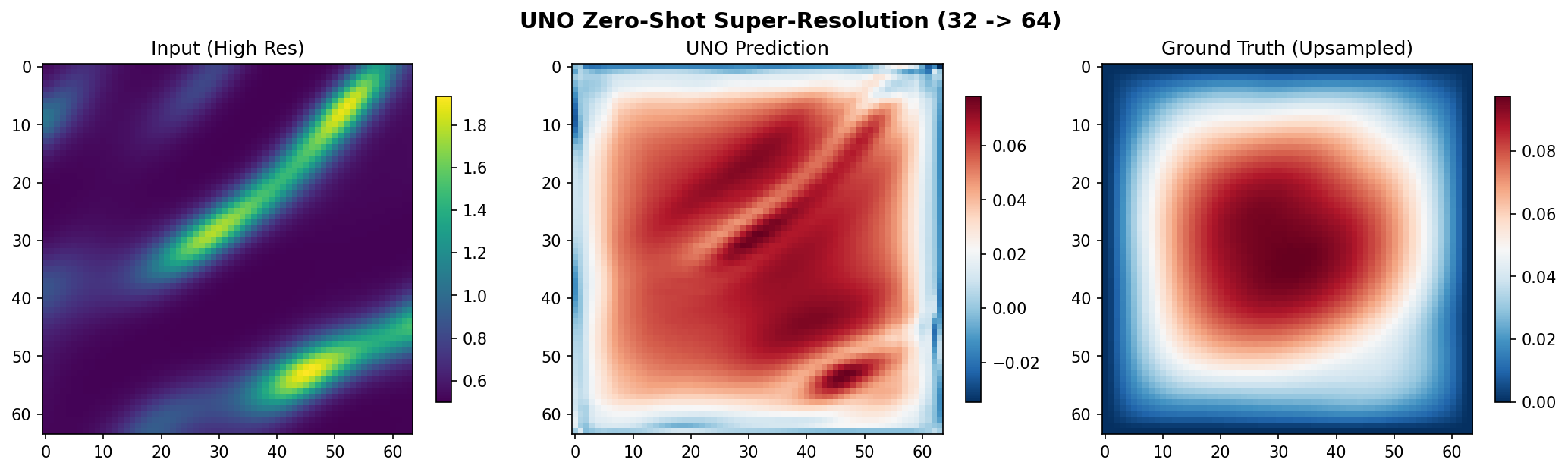
Zero-Shot Super-Resolution
The model trained at 32x32 resolution is evaluated here at 64x64. The prediction captures the overall pressure field structure without any retraining.
Terminal Output:
Generating visualizations...
Predictions saved to docs/assets/examples/uno_darcy/uno_predictions.png
Super-resolution saved to docs/assets/examples/uno_darcy/uno_superresolution.png

======================================================================
UNO Darcy Flow example completed in 32.7s
Test MSE: 1.029011e-05, Relative L2: 0.012214
Results saved to: docs/assets/examples/uno_darcy
======================================================================
Results Summary
| Metric | Value | Notes |
|---|---|---|
| Training Loss (final) | 1.10e-02 | Relative-L2 on training set |
| Validation Loss (final) | 6.11e-04 | Relative-L2 on held-out validation |
| Test MSE | 1.03e-05 | Mean squared error on physical pressure |
| Test Relative L2 | 0.0122 | Mean relative L2 across 128 test samples |
| Min / Max Relative L2 | 0.0057 / 0.0404 | Best and worst test sample |
| Super-Resolution L2 (32 -> 64) | 0.0402 | Zero-shot on 128 real 64^2 Darcy solves |
| Total Parameters | 4,260,129 | hidden=64, 5-layer Fourier U |
| Training Time | 32.7 sec | Single GPU (CUDA) |
What We Achieved
- Built a U-shaped Neural Operator (Rahman et al. 2022) with five Fourier blocks using a single
create_unocall, wrapped with aGridEmbedding2Dpositional encoding - Applied the standard operator-learning recipe -- grid embedding, Gaussian normalization, and the relative-L2 loss
- Trained on 1024 Darcy flow samples batched through datarax in ~33 seconds on GPU
- Reached 1.22% mean relative L2 error on the held-out test set
- Demonstrated genuine zero-shot super-resolution: 4.02% relative L2 on real 64x64 solves after training only at 32x32 -- only ~3x the in-distribution error
- Produced visualizations comparing predictions against ground truth with error maps
Interpretation
With the full operator-learning recipe, the U-NO learns the permeability-to-pressure
mapping to roughly 1.2% relative L2 error. Three ingredients drive this: the
GridEmbedding2D coordinate channels give the spectral layers absolute position
information for the boundary-value problem; Gaussian normalization standardizes the
input and output fields so the spectral weights converge cleanly; and the relative-L2
loss directly optimizes the metric we report. Because the U-NO performs every resolution
change in the Fourier domain, the super-resolution result (4.0% on real high-resolution
solves) is a genuine demonstration of discretisation invariance, not an artifact of
comparing against an interpolated reference.
Next Steps
Experiments to Try
- More training data: Increase
N_TRAINto 2000+ for better generalization - Higher capacity: Widen
uno_out_channels(e.g.[64, 128, 128, 128, 64]) or raiseuno_n_modesfor a more expressive model - Longer training: Increase
NUM_EPOCHSfor lower relative L2 error - Mixed precision: Use
jnp.bfloat16for 40-50% memory reduction on large grids - Gradient checkpointing: Use
TrainingConfig(gradient_checkpointing=True)for 3-5x memory savings at high resolution
Related Examples
| Example | Level | What You'll Learn |
|---|---|---|
| FNO on Darcy Flow | Intermediate | Standard FNO pipeline for comparison with UNO |
| U-FNO on Turbulence | Intermediate | U-FNO architecture for turbulence modeling |
| SFNO with Conservation Laws | Intermediate | Spherical neural operator for climate data |
| Neural Operator Benchmark | Advanced | Cross-architecture comparison (FNO, UNO, SFNO, U-FNO) |
| Grid Embeddings | Beginner | Spatial coordinate injection for neural operators |
API Reference
create_uno- UNO factory functionTrainer- Training orchestration with JIT compilationTrainingConfig- Training hyperparameter configurationcreate_darcy_loader- datarax-based Darcy flow data loader
Troubleshooting
OOM during training at high resolution
Symptom: jaxlib.xla_extension.XlaRuntimeError: RESOURCE_EXHAUSTED
Cause: The UNO encoder-decoder and skip connections consume more memory than a standard FNO, especially at higher resolutions.
Solution:
# Option 1: Reduce batch size
config = TrainingConfig(batch_size=2)  # Was 4

# Option 2: Enable gradient checkpointing
config = TrainingConfig(gradient_checkpointing=True, gradient_checkpoint_policy="dots_saveable")

# Option 3: Use mixed precision
X_train = X_train.astype(jnp.bfloat16)
NaN in training loss
Symptom: Loss becomes nan after a few epochs.
Cause: Learning rate too high for the model capacity, or numerical instability in spectral convolutions.
Solution:
# Add gradient clipping via optax
import optax
optimizer = optax.chain(
    optax.clip_by_global_norm(1.0),
    optax.adam(1e-4),  # Reduced learning rate
)
Forward pass shape mismatch
Symptom: Model output shape does not match target shape.
Cause: The in_channels and out_channels parameters must match your data
dimensions. UNeuralOperator expects channels-first (batch, channels, height, width);
the UNOWithGrid wrapper above accepts channels-last (batch, H, W, channels) and
transposes internally.
Solution:
# Ensure channel dimension is present (channels-last for the wrapper)
x_data = permeability[..., None]  # (batch, H, W) -> (batch, H, W, 1)
model = create_uno(in_channels=1, out_channels=1, ...)
Super-resolution produces poor results
Symptom: Predictions at higher resolution are noisy or structurally wrong.
Cause: The model was trained with too few samples or epochs to learn robust frequency-space representations.
Solution: Increase N_TRAIN and NUM_EPOCHS during training. Also ensure the
number of retained Fourier modes is sufficient to capture the dominant spatial
frequencies at the target resolution.
Slow first training step
Symptom: First epoch takes much longer than subsequent epochs.
Cause: JAX/XLA compiles the computation graph on the first call. This is expected behavior.
Solution: No action required. The Trainer JIT-compiles the training step
automatically. Subsequent steps reuse the compiled function and run at full speed.